
VIVO Pneumatic Arm Quad Ultrawide
4.5Editor score
Supports up to 49 inch ultra wides
Pneumatic height adjustment technology
Heavy duty cast aluminum construction
Creating a productive workspace often requires multiple screens to handle various tasks efficiently. A 4 Monitor Mount with Adjustable Arms allows you to elevate your displays, freeing up valuable desk space while improving ergonomics for long work sessions.
We evaluated ten leading quad monitor mounts based on build quality, range of motion, weight capacity, and ease of installation. Each product offers unique features to suit different desk setups, from budget-friendly steel frames to premium pneumatic arms.
Every selection below highlights key specifications, pros, and cons to help you find the perfect fit for your monitors. Please note that prices and availability can change frequently, so verify current details before making your final purchase decision.
4.5Editor score

4.5Editor score

4.5Editor score
As an Amazon Associate we earn from qualifying purchases.
The following table provides a side by side comparison of all ten selected quad monitor mounts. Review the specifications to identify which model best matches your screen sizes and weight requirements.



The WALI Stacked 4 Monitor Mount stands out as a top choice for users needing a reliable quad setup for standard monitors. With a strong rating of 4.5 stars, this mount proves its worth through stable construction and thoughtful design features.
We may earn a commission when you buy through this link, at no additional cost to you.
Its universal compatibility supports screens up to 27 inches with a weight capacity of 22 pounds per arm. The fully adjustable arms allow tilt, swivel, and rotation to find the optimal viewing angle. Cable management keeps wires tucked neatly into the arms.
While it does not support ultra wide screens or pneumatic adjustments, the price point makes it accessible for most budgets. The C clamp and grommet options provide flexibility for different desk thicknesses without requiring permanent modifications.
This mount is ideal for home offices or workstations where four standard monitors are used for multitasking. It transforms cluttered desks into professional setups while reducing neck strain through ergonomic positioning.
Lifting four monitors off the desk surface creates ample room for keyboards, notebooks, or other essential items you need within reach.
Raising screens to eye level reduces back and neck strain, allowing for comfortable extended work sessions without fatigue.
We may earn a commission when you buy through this link, at no additional cost to you.
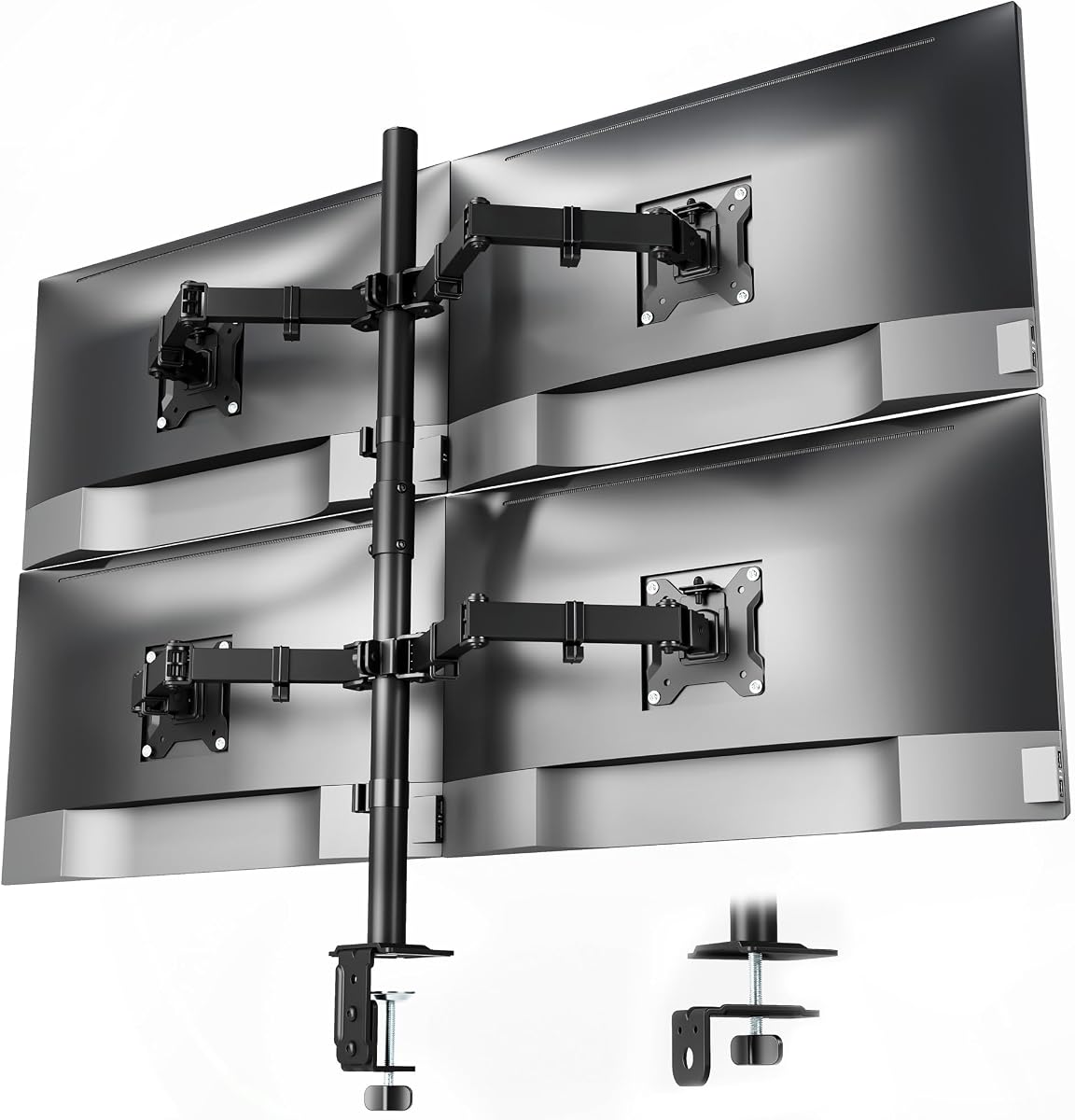
The VIVO Pneumatic Arm Quad Ultrawide mount is engineered for power users who need to support massive screens. Its 4.5 star rating reflects the high quality of the cast aluminum build and the smooth operation of the pneumatic system.
We may earn a commission when you buy through this link, at no additional cost to you.
This mount can handle up to 49 inch screens on individual arms or multiple ultra wides up to 38 inches. The pneumatic technology allows you to move monitors effortlessly with just a touch, counterbalancing the weight perfectly without sagging.
Although it commands a premium price, the durability and flexibility justify the investment for professional environments. The high capacity tilt joints ensure stability even with heavy loads, while the detachable plates simplify mounting.
Choose this if you need a robust solution for large displays that require frequent height changes. It offers the ultimate in flexibility and strength for complex multi-monitor setups.
Powerful pneumatic arms counterbalance monitor weight, letting you find the ideal screen height at the touch of a hand without struggle.
Premium cast aluminum provides maximum strength and scratch resistance, ensuring the mount lasts for years of heavy daily use.
We may earn a commission when you buy through this link, at no additional cost to you.
The MOUNT PRO 4 Monitor Mount delivers excellent value for those seeking an economical quad setup. It holds a 4.5 star rating for providing solid performance without breaking the bank.
We may earn a commission when you buy through this link, at no additional cost to you.
Designed for screens up to 32 inches, it supports 17.6 pounds per arm, which covers most standard office displays. The extra tall pole allows for flexible viewing heights whether you prefer sitting or standing positions.
Installation is straightforward with labeled parts and clear instructions. The included cable clips help keep wires organized, maintaining a neat desk appearance. While it lacks premium features like gas springs, it gets the job done effectively.
This is the perfect entry level choice for home offices or budget conscious users. It provides essential adjustability and space saving benefits at a fraction of the cost of high end models.
Get the benefits of a quad monitor setup without the high cost, making multi-screen work accessible to everyone.
Reach heights of 31.7 inches to adjust your screens for comfortable viewing in either sitting or standing positions.
We may earn a commission when you buy through this link, at no additional cost to you.
The PUTORSEN Quad Monitor Mount is specifically designed for a hybrid setup featuring a large ultrawide on top and smaller screens below. With a 4.5 star rating, it offers a specialized solution for advanced multitasking needs.
We may earn a commission when you buy through this link, at no additional cost to you.
This mount holds a 49 inch ultra wide above and up to three 27 inch monitors below securely. The 3-section arm design distributes weight evenly to prevent sagging at the joints. You can even remove segments to reduce extension if needed.
The gas spring extension and center pole height adjustment provide smooth positioning to eliminate strain. Installation is facilitated by detachable VESA plates and options for both C-clamp and grommet bases.
Ideal for traders or professionals needing a specific layout, this mount combines heavy-duty strength with flexible positioning. It addresses common issues with standard quad mounts that struggle with uneven weight distributions.
Hold a massive 49 inch screen on top while managing lower screens, giving you the ultimate multi-tasking canvas.
The 3-section arm distributes weight evenly to hold monitors steady and level without drooping at the joints.
We may earn a commission when you buy through this link, at no additional cost to you.
The monTEK Quad Monitor Stand is designed to handle screens ranging from 17 to 32 inches with a solid weight capacity of 22 lbs each. Its 4.5 star rating highlights its reliability for everyday office tasks.
We may earn a commission when you buy through this link, at no additional cost to you.
Built with high-grade materials, this mount ensures stability and eliminates the risk of sagging. The range of motion allows tilt from -45 to +45 degrees, swivel, and rotation, helping you achieve an ergonomic viewing position easily.
Setup is effortless with C-clamp or grommet options, and quick-release plates simplify monitor attachment. The included cable organizers keep wires tidy and out of sight, enhancing comfort during work or entertainment.
This is a practical choice for users needing a dependable quad setup without complex features. It balances cost and quality well for general productivity needs.
Built with high-grade materials and an advanced joint design, our mount keeps your display securely in place and perfectly level.
The quad monitor mount helps you declutter your desk and create more usable space for your daily workflow needs.
We may earn a commission when you buy through this link, at no additional cost to you.
The MOUNTUP Quad Monitor Stand is a user-friendly option for standard monitors up to 32 inches. It has earned a 4.5 star rating for its ease of use and functional design.
We may earn a commission when you buy through this link, at no additional cost to you.
One solid base supports the four arms, helping you save table space effectively. You can freely adjust height along the center pole and rotate monitors for landscape or portrait orientation to find the right viewing angle.
Assembly takes less than 20 minutes thanks to quick-release VESA plates and clear instructions. Cable clips keep wires protected and organized, ensuring a clean setup from the start.
This mount is ideal for standard workspaces where simplicity is key. It offers the essential features needed for a comfortable multi-monitor experience without unnecessary complexity.
One solid base supports 4 monitor arms, helping you save table space for other important office items.
The monitor desk mount is easy to assemble with C-clamp or grommet mount, ready for use in minutes.
We may earn a commission when you buy through this link, at no additional cost to you.
The VIVO Quad Pneumatic Monitor Mount offers a balance of durability and smooth operation for screens up to 32 inches. With a 4.4 star rating, it stands out for its pneumatic features that aid in positioning.
We may earn a commission when you buy through this link, at no additional cost to you.
Dual pneumatic arms allow smooth transitions by counterbalancing the monitors, while fixed center brackets ensure stability. The steel and aluminum support is robust enough to hold 17.6 lbs per arm securely.
Installation is drill-free thanks to the heavy-duty C-clamp that secures to surfaces up to 3.25 inches thick. Tension can be adjusted for heavier monitors to provide flexibility for your specific setup needs.
Choose this if you want pneumatic convenience without needing ultra-wide support. It provides the strength and smooth adjustability needed for comfortable long-term use.
Dual side pneumatic arms allow smooth transitions by counterbalancing the monitors to ideal height at a touch.
Securely attach to your surface without drilling, preserving the desk surface for a clean setup.
We may earn a commission when you buy through this link, at no additional cost to you.
The Pholiten Quad Monitor Arm is designed with a focus on ergonomics and space efficiency. Its 4.4 star rating reflects user satisfaction with its ability to improve posture and desk organization.
We may earn a commission when you buy through this link, at no additional cost to you.
Gas spring arms provide smooth and effortless monitor positioning with superior weight support. You can adjust the height and position of each arm to allow your body to work comfortably without strain.
This mount is sandwiched on the back of the table, lifting monitors from the surface to save space. It supports up to 32 inch screens and offers both C-clamp and grommet installation options for flexibility.
Ideal for users focused on comfort and cleanliness, this mount helps create a healthy workstation. It balances performance with design to enhance your daily work life.
One advantage is that it occupies very little space on the desktop, lifting the monitor from the surface of the table.
Allows users to adjust the stand according to their height and position to support health and posture.
We may earn a commission when you buy through this link, at no additional cost to you.
The WALI Quad Monitor Desk Mount has achieved a strong 4.6 star rating for its versatility and reliability. It supports screens from 13 to 32 inches with a generous 22 lbs weight capacity.
We may earn a commission when you buy through this link, at no additional cost to you.
High-grade arms extend and retract with +/-90 degree tilt and swivel options. The double benefits include raising screens to an ideal height and opening up desk space for a clutter-free work area.
Detachable VESA plates and a two-stage locking system ensure secure installation. Built-in cable management guides wires along the arms to keep cords out of sight and organized.
This is a dependable choice for general office use. It offers the essential tools needed to maintain a tidy and ergonomic multi-monitor workstation.
By lifting 4 screens off the desktop, this mount opens up valuable space for your keyboard and docking station.
Double efficiency and productivity by opening up desk space and allowing work in an ergonomically correct position.
We may earn a commission when you buy through this link, at no additional cost to you.
The VIVO Quad Monitor Clamp Mount is built solidly to support screens up to 32 inches with stability. Its 4.3 star rating indicates reliable performance for home office workstations.
We may earn a commission when you buy through this link, at no additional cost to you.
Arms offer plus15 to minus15 degree tilt, 180 swivel, and 360 rotation for ideal viewing. The longer upper bracket allows your top monitor to angle downward and easily align with the lower monitors.
Mounting is drill-free with a heavy-duty C-clamp that secures to surfaces up to 3.94 inches thick. Padding is included to protect your surface from scratches during installation and use.
This mount is excellent for team projects or monitoring setups where space is limited. It provides the flexibility needed to organize screens efficiently for better productivity.
Lets you win back valuable space and improve multitasking capabilities by keeping four monitors off the desk.
Mounting your monitors is a simple process with all hardware and step-by-step instructions provided for assembly.
We may earn a commission when you buy through this link, at no additional cost to you.
Selecting the right quad monitor mount requires understanding your specific needs regarding screen size, weight, and desk configuration. This guide outlines key factors to consider before purchasing.
Ensure the mount supports the diagonal size and VESA pattern of your screens. Most mounts fit 75x75mm or 100x100mm holes, but ultrawide screens often have different requirements.
Always check the manufacturer specs to verify that your specific monitors are listed as compatible before buying.
Each arm must support the weight of your monitors including any accessories. If the arm is rated for less than your monitor weighs, it may sag or fail over time.
Look for mounts where the weight capacity exceeds your heaviest screen by at least 10 percent for safety.
Check if your desk thickness falls within the clamp range of the mount. Some desks are too thick for standard C-clamps or require a grommet hole for stability.
Choose C-clamp for solid surfaces and grommet for desks with pre-drilled holes to ensure a secure fit.
Consider the range of motion for tilt, swivel, and rotation. Pneumatic or gas spring systems offer smoother adjustments than standard mechanical springs.
Select features that allow you to position screens for ergonomics and glare reduction throughout your day.
Steel and aluminum construction provides long-lasting stability compared to plastic components. Heavy duty materials prevent wobbling during typing or adjustments.
Prioritize metal builds if you plan to use the mount daily for several years.
Integrated cable clips or channels keep wires organized and out of sight. This reduces clutter and makes cleaning your desk easier.
Look for mounts that guide cables along the arms for a polished professional appearance.
Review the assembly instructions to ensure they are clear and all necessary hardware is included. Quick-release VESA plates make attaching monitors simpler.
Choose mounts that promise quick setup to avoid frustration during installation.
Compare prices against the features offered to determine value. Basic steel mounts cost less than premium pneumatic options.
Invest in higher quality materials if you plan to use the mount frequently or for heavy screens.
Begin by reading the manual and ensuring you have the correct tools. Attach the mount to your desk using the provided clamp or grommet and secure it tightly without exceeding desk thickness limits.
Mount each monitor on the VESA plates and tighten the screws. Adjust the height and angles to match your ergonomic needs, ensuring screens are level and at eye height.
Periodically check all screws and joints to maintain stability. Clean the arms with a dry cloth to remove dust and avoid using harsh chemicals that could damage the finish.
Most mounts support between 17.6 lbs and 22 lbs per arm. Premium options can handle up to 44 lbs for ultra-wide screens. Always check the specific product weight limit before purchasing.
Yes, most quad mounts are compatible with both flat and curved screens. Ensure the monitor has VESA holes and fits within the weight and size limits of the mount.
No, most mounts use a C-clamp or grommet base that does not require drilling. However, a grommet hole must exist or be drilled if you prefer that mounting option.
You can slide the arms along the vertical pole or use pneumatic tension to move screens up and down. Check the product features for the specific height adjustment method.
Many models come with integrated cable clips or channels to keep wires organized. Review the product description to confirm if cable management tools are provided.
Yes, most mounts allow 360-degree rotation, enabling you to switch between landscape and portrait orientations easily.
We have reviewed the top 10 quad monitor mounts for 2026 to help you find the perfect fit for your setup. Whether you choose the WALI Stacked for value or the VIVO Pneumatic for premium performance, each offers unique benefits.
When selecting your mount, prioritize build quality and weight capacity to ensure long-term stability. Ergonomic features and ease of installation should also play a major role in your decision.
Remember to check current prices and availability as these details may change frequently. Investing in a high-quality mount will transform your workspace and improve your daily productivity.