
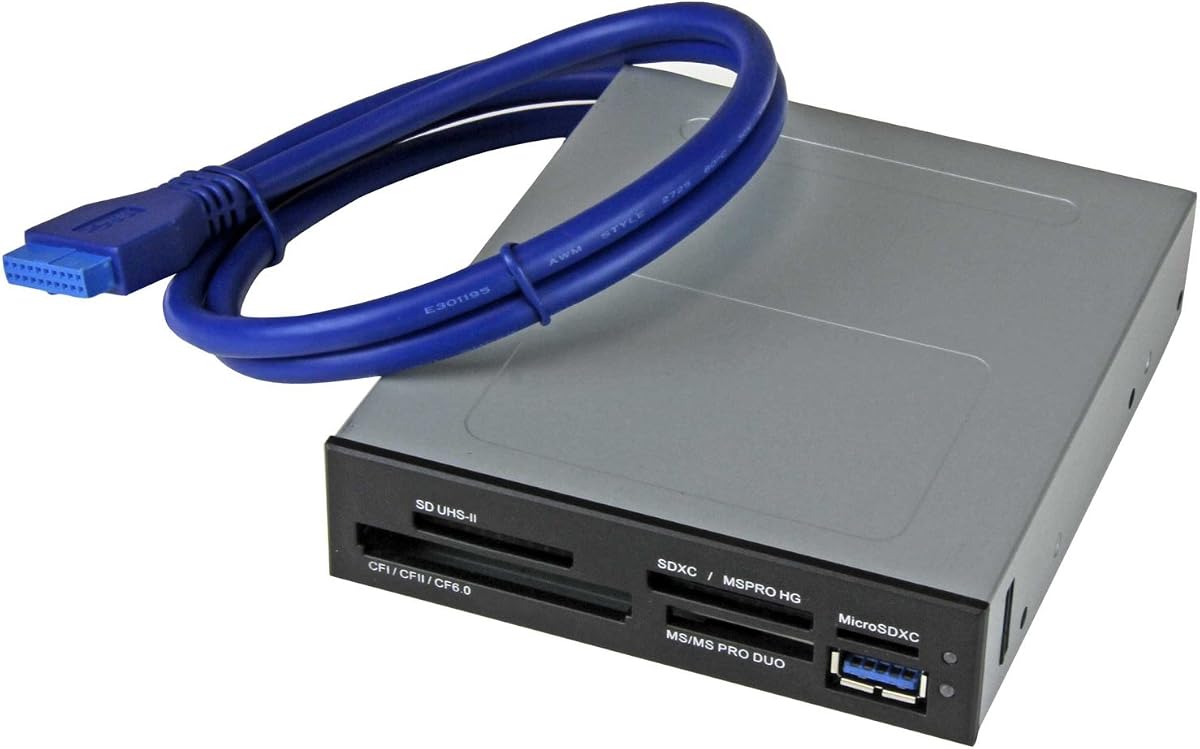
SABRENT 74 in 1 3.5 Inch Internal Flash Media Card Reader
4.0Editor score
74 card type support
Includes USB 2.0 port
Internal power connector
This guide compares the top internal media card readers for desktop PCs offering fast transfer speeds and broad format support for photographers and professiona
Internal media card readers provide a convenient way to access memory cards directly from your desktop computer. They eliminate the need for external dongles and keep your workspace organized while delivering reliable performance.
We compared ten top models based on compatibility speed and build quality. Our analysis covers USB 2.0 and 3.0 options with support for SD CF and Memory Stick formats to help you choose the right fit.
Each pick highlights specific strengths for different use cases from budget builds to professional workstations. Note that availability and pricing may change so verify current details before purchasing your preferred model.
4.0Editor score
4.5Editor score

5.0Editor score
This side by side comparison outlines the key specifications and strengths of each internal card reader model to help you decide which one matches your desktop setup and workflow needs.


The StarTech Internal Card Reader stands out as a top choice for professionals needing reliable high speed access to multiple memory card formats. With a solid 4.5 rating it delivers consistent performance for videography and photography workflows.
We may earn a commission when you buy through this link, at no additional cost to you.
Its USB 3.0 interface supports UHS-II cards allowing faster data transfers compared to older models. The ability to access four different card slots simultaneously means you can copy files between cards without swapping them out constantly.
While it costs more than basic models the build quality and TAA compliance make it suitable for enterprise environments. The included cables and screws simplify installation and the built-in LEDs provide clear status feedback.
If you need a robust internal solution for a workstation this reader offers the best balance of speed and versatility. It is ideal for anyone who regularly handles large media files and wants front panel convenience.
The USB 3.0 interface ensures that large video files and RAW photos move quickly between cards and your system without bottlenecks.
Designed for IT professionals this reader is backed by a two year warranty and lifetime support to keep your workflow uninterrupted.
We may earn a commission when you buy through this link, at no additional cost to you.
The SABRENT 74 in 1 Reader is an excellent budget friendly option for users who need broad format support without breaking the bank. It holds a 4.0 rating for its reliability and extensive list of supported memory cards.
We may earn a commission when you buy through this link, at no additional cost to you.
It supports 74 different types of memory cards making it one of the most versatile readers available. The internal power connector ensures it has enough juice for external USB devices and the included USB 2.0 port adds extra connectivity.
While it uses USB 2.0 which is slower than 3.0 it is sufficient for most casual users and small file transfers. The plastic build is functional but not as premium as higher end models.
For home users or hobbyists who need a straightforward solution this reader delivers great value. It is perfect for anyone who wants to access various card types without spending much money.
With support for 74 card types this reader covers nearly every legacy and modern format you might encounter in your collection.
The extra USB 2.0 port on the front panel gives you more options to connect drives or phones without reaching behind the PC.
We may earn a commission when you buy through this link, at no additional cost to you.
The Vantec Link USB 3.0 Reader has earned a perfect 5.0 rating for its exceptional performance and support for high capacity cards. It is designed for users who need to handle large SD and microSD files efficiently.
We may earn a commission when you buy through this link, at no additional cost to you.
It supports UHS-I cards with high speed modes like SDR104 and DDR50 which significantly boost transfer rates. The ability to handle capacities up to 2TB for SD cards makes it future proof for growing storage needs.
While it is not as broad in legacy card support as some models it excels at modern SD formats. The quad data access feature for Memory Stick cards enhances throughput for compatible media.
If you work with high resolution video or large photo libraries this reader is a top choice. It offers the reliability and speed needed for professional editing environments.
Supporting SD cards up to 2TB ensures you can use the largest memory cards available today and in the future without issues.
Advanced UHS-I modes allow for rapid transfers of large files saving you time during data import sessions.
We may earn a commission when you buy through this link, at no additional cost to you.
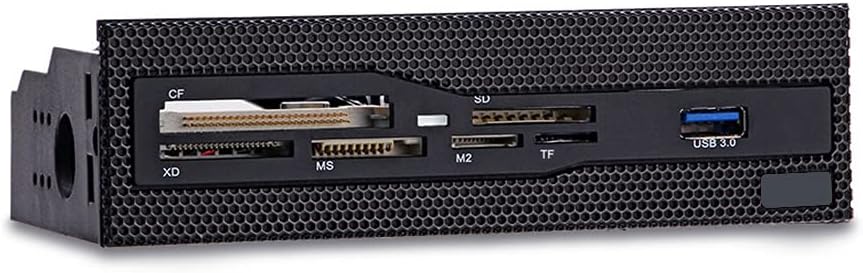
The 5.25 Internal Card Reader offers a straightforward solution for users with larger drive bays. It has a 4.3 rating and focuses on providing high speed access to common card formats without extra complexity.
We may earn a commission when you buy through this link, at no additional cost to you.
Its USB 3.0 interface allows for fast data transmission and the copper plated slots ensure stable connections during use. The six card slots cover CF XD MS M2 TF and more making it versatile for general use.
The grid panel design allows it to integrate well with cases that have a front mesh panel. It is simple to install and provides direct access to cards from the front of your desktop.
This reader is a good choice for those who want speed and simplicity without paying for extra features. It fits well in budget builds or secondary systems where front card access is needed.
The USB 3.0 interface ensures that you can move files quickly between your memory cards and the computer system.
Copper plated card slots provide better conductivity and stability which helps maintain reliable performance over time.
We may earn a commission when you buy through this link, at no additional cost to you.
The 5.25inch Media Dashboard combines a card reader with a USB hub and audio jacks to provide a complete front panel solution. It has a 3.8 rating reflecting varied user experiences with its multifunctional design.
We may earn a commission when you buy through this link, at no additional cost to you.
It supports a multi-format card reader and includes a USB 3.0 hub for additional device connectivity. The dedicated front panel audio jacks eliminate the need to reach behind the chassis for speakers or microphones.
While it offers many features the installation requires multiple cables for USB SATA and audio which can be tricky. The LED indicators help show power and drive activity status clearly.
This panel is suitable for custom PC builders who want a lot of front access in one place. It is a good option if you need extra ports and audio jacks alongside card reading.
Combining card reading USB hubs and audio jacks this panel reduces clutter by bringing multiple functions to the front.
USB 3.0 and eSATA support ensure that file transfers are fast enough for creative work with large media files.
We may earn a commission when you buy through this link, at no additional cost to you.
The TCC-QL5E Dashboard is a multifunctional front panel that supports multiple USB ports SATA eSATA and a card reader. It aims to provide extensive connectivity options for desktop users needing front access.
We may earn a commission when you buy through this link, at no additional cost to you.
It includes a built-in USB 3.0 port and multiple USB 2.0 ports along with audio connectors for speakers and microphones. The LED indicators show power and hard disk read write status for added visibility.
The installation involves connecting several cables for data and power which may require careful cable management inside the case. It supports memory cards up to 64GB for basic data transfer needs.
This dashboard is ideal for users who want to expand their front panel capabilities significantly. It offers a lot of connectivity in one unit though setup may take more time than simpler readers.
With six USB ports and SATA eSATA options this panel gives you ample room to connect multiple devices at once.
The dedicated audio ports save you from having to plug devices into the back of your computer case repeatedly.
We may earn a commission when you buy through this link, at no additional cost to you.
The Sony MRW620/U1/181 is a trusted internal card reader from a well known brand. It holds a 4.0 rating for its reliability and broad support for 17 different memory card formats.
We may earn a commission when you buy through this link, at no additional cost to you.
It includes black and ivory colored faceplates so you can choose the look that best matches your PC case. The software helps with drive letter recognition making card access seamless after installation.
While it supports older operating systems like XP and Vista it may not have the latest high speed features found in newer models. It is a solid choice for legacy systems or general home use.
If you prefer a reliable brand and need basic card reading this model delivers consistent performance. It is simple to use and fits standard 3.5 inch bays without issues.
Sony is known for quality electronics and this reader reflects that with a steady track record of reliable operation.
Having both black and ivory faceplates allows you to match the reader to your system aesthetics easily.
We may earn a commission when you buy through this link, at no additional cost to you.
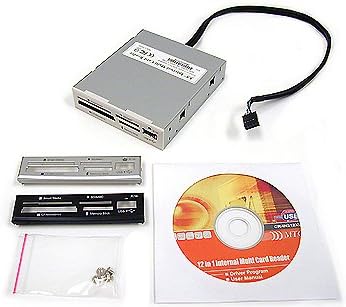
The All-In-One Internal Card Reader is a compact option designed for smaller drive bays with a 2.5 inch form factor. It has a perfect 5.0 rating suggesting high user satisfaction with its reliable performance.
We may earn a commission when you buy through this link, at no additional cost to you.
It comes with black silver and white bezels so you can swap them to match your case design. The build is described as high quality which contributes to its positive reception among users.
While it is simple in design it serves the basic function of reading internal flash cards effectively. It is a good choice if you have space constraints or prefer a smaller footprint.
This reader is best for users who want a straightforward compact solution without extra features. It offers a clean look and reliable operation for everyday card reading tasks.
The 2.5 inch size makes it suitable for cases where space is limited or you want to keep the front panel clean.
Multiple bezel colors allow you to match the reader to your PC case for a cohesive look.
We may earn a commission when you buy through this link, at no additional cost to you.
The Akasa AK-ICR-07 Internal Card Reader offers six ports for memory cards plus an additional USB port for extra connectivity. It has a 4.2 rating for its balance of features and ease of use.
We may earn a commission when you buy through this link, at no additional cost to you.
It includes two front fascia panels in black and white so you can choose the color that fits your build. The dedicated ports for adapters mean you do not need extra adapters for microSD or M2 cards.
The LEDs provide clear status feedback showing power card presence and data transfer activity. It is compatible with high capacity SDHC cards making it suitable for modern storage needs.
This reader is a good middle ground choice for users who want extra connectivity without too much complexity. It fits standard 3.5 inch bays and provides reliable card access.
The additional USB port lets you connect memory sticks or phones directly to the front for quick data transfers.
LEDs indicate power and card presence making it easy to see when data is being read or written.
We may earn a commission when you buy through this link, at no additional cost to you.
The MTG CR-IN212XU-1 Internal Card Reader supports 22 different card types and features a metal case for durability. It offers a reliable way to read multiple formats with basic USB 2.0 connectivity.
We may earn a commission when you buy through this link, at no additional cost to you.
It supports four slots for simultaneous data exchange and includes multiple bezel options for customization. The plug and play capability means no extra drivers are needed for basic operation.
While USB 2.0 is slower than 3.0 it is sufficient for general file transfers. The metal construction adds a premium feel compared to plastic alternatives at a similar price point.
This reader is suitable for users who need broad format support and a sturdy build on a budget. It provides straightforward card access without requiring advanced features.
The metal construction helps protect the internal components and gives the reader a solid premium feel.
With support for 22 card types this reader covers most legacy and modern formats you might need.
We may earn a commission when you buy through this link, at no additional cost to you.
Choosing the right internal media card reader depends on your specific needs including transfer speed format support and case compatibility. This guide breaks down key factors to help you make an informed decision.
The interface speed determines how fast you can transfer data from memory cards to your computer. USB 3.0 and 3.1 models offer much faster transfer rates than USB 2.0 which is crucial for large video files.
Prioritize USB 3.0 or higher if you work with large media files regularly.
Check which memory card formats the reader supports to ensure it works with your current and future cards. Look for support for SD SDHC SDXC CF MS and TF formats depending on your devices.
Choose a model that supports all the card types you currently own.
Internal readers are designed to fit specific drive bay sizes such as 3.5 inch or 5.25 inch. Measure your available space before purchasing to ensure a proper fit.
Verify your case has a matching drive bay for the reader you choose.
Some models include extra USB ports or audio jacks which can add versatility to your front panel. Consider if you need these extra features or just a simple card reader.
Extra ports add convenience but may complicate installation.
Build quality affects longevity and connection stability. Metal cases generally offer better protection and heat dissipation than plastic ones.
Opt for metal construction if you want a durable long lasting solution.
Some readers require internal headers for data and power while others plug directly into SATA. Consider your comfort level with internal PC assembly.
Simpler plug-in models are easier to install for beginners.
A good warranty can protect your investment against defects. Look for models with at least a one year warranty and accessible support.
Choose brands that offer clear warranty terms and support.
Prices vary significantly based on features and build quality. Determine a budget that balances your needs with affordability.
Set a clear budget to narrow down your options quickly.
Install the reader into the appropriate drive bay and connect the necessary internal cables for data and power. Ensure all connections are secure before powering on your system.
Insert your memory card into the correct slot and wait for the system to recognize it. Use file explorer to access and transfer your data as needed.
Eject the card safely before removal to prevent data corruption. Keep the slots free of dust and debris to maintain long term performance.
An internal media card reader is a device installed inside a desktop computer to read memory cards. It connects directly to the motherboard and provides front panel access for cards without external dongles.
An internal reader offers convenience and faster access if you frequently use memory cards. External readers can be lost or damaged and do not save on desktop space.
USB 3.0 is better for large file transfers as it offers much faster speeds. USB 2.0 is adequate for small files but slows down with large media.
Most internal readers are designed for desktop towers not laptops. Laptops usually use external USB card readers due to space constraints and limited internal bays.
Multiple slots let you read different card types without swapping cards frequently. This saves time and makes transferring files between cards easier.
Measure the available space in your PC case or check the manual. Common sizes are 3.5 inch for standard bays and 5.25 inch for larger optical drive bays.
Some readers draw power from the motherboard while others require extra connectors. Check the product specs to see if you need to connect additional power cables.
Most modern readers are plug and play and do not need extra drivers. Older models may require specific drivers for certain operating systems.
Our top picks include the StarTech reader for professionals the SABRENT 74 in 1 for budget users and the Vantec Link for high speed SD card access.
Prioritize transfer speed and card support that matches your workflow to get the most out of your internal reader.
Always check current availability and specs before buying to ensure the model fits your system and needs.