
CENMATE Aluminum 4 Bay
4.3Editor score
Affordable four-bay aluminum enclosure
Supports USB 3.0 up to 5Gbps
Includes cooling fan and power adapter
Discover the top Direct Attached Storage units for speed and capacity. This guide compares ten leading DAS enclosures to help you expand your computer storage
Direct Attached Storage provides a reliable way to expand your computer storage without network complexity. These enclosures connect directly via USB or Thunderbolt, offering fast data transfer and easy management. Choosing the right DAS means balancing speed, capacity, and cooling for your specific workflow needs.
We evaluated ten top-rated DAS enclosures based on connection speed, drive compatibility, cooling performance, and build quality. Each product offers unique features like hardware RAID, hybrid bays, or hot-swappable design. Our analysis helps you identify the best fit for personal, creative, or enterprise use cases.
Each pick highlights key strengths, pros, cons, and ideal use cases to guide your decision. Prices and availability change frequently, so always check the current listings before purchasing. This guide ensures you find a storage solution that meets your performance and reliability requirements today.
4.3Editor score

4.2Editor score

4.2Editor score
This side-by-side comparison reviews all ten Direct Attached Storage units to highlight their key specifications and unique selling points. Use this table to quickly identify differences in bay count, connection types, and special features like RAID or hybrid support.


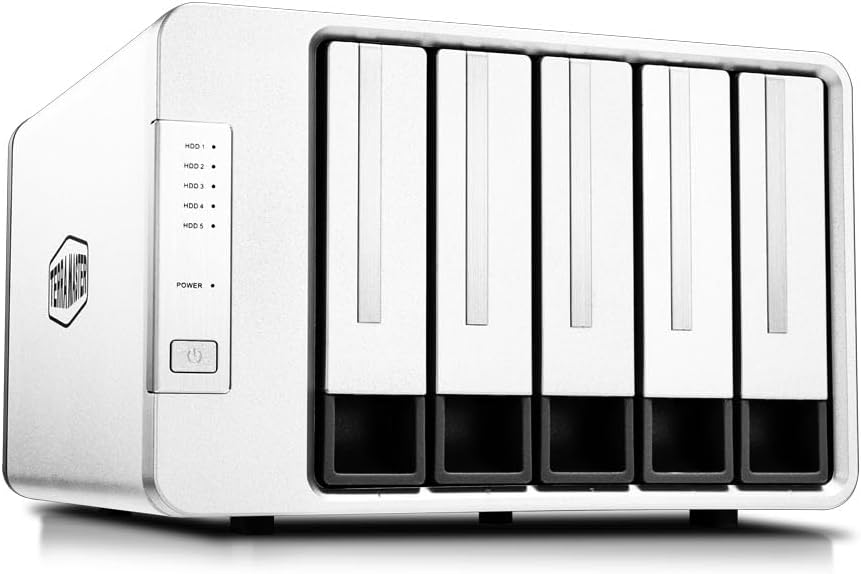


The TERRAMASTER D4-320 stands out as the top Direct Attached Storage choice for users seeking a balance of speed and usability. With a strong 4.2 rating, it delivers reliable performance for expanding storage without network overhead. Its intelligent cooling and push-lock tray design make it ideal for frequent access.
We may earn a commission when you buy through this link, at no additional cost to you.
Performance shines with USB 3.2 Gen2 speeds up to 10Gbps, enabling fast transfers for large media files. The tool-free hot-swappable trays allow you to replace drives instantly without powering down. Sound-absorbing panels keep noise low, making it suitable for office environments where quiet operation matters.
While it lacks hardware RAID, its independent drive mode works well for users who manage backups via software. The fan may spin up during heavy loads, but temperature control prevents overheating. These trade-offs are acceptable given the speed and flexibility offered at this price point.
Buy this if you need a robust, fast DAS for creative workflows or personal storage. Its compatibility with Windows, Mac, and Linux makes it versatile. For those prioritizing speed and ease of use over redundancy, the D4-320 is the recommended choice today.
The USB Type-C interface supports multiple protocols including USB 3.0 to Thunderbolt 4, ensuring broad compatibility across devices.
Intelligent temperature-controlled fans and sound-dampening panels ensure drives stay cool while maintaining a quiet working environment.
We may earn a commission when you buy through this link, at no additional cost to you.
The QNAP TR-004 is the best premium Direct Attached Storage option for users needing hardware-level data redundancy. With a 4.2 rating, it offers RAID support and lockable bays, making it ideal for small businesses or creative pros managing critical files. Its USB Type-C connection ensures fast throughput.
We may earn a commission when you buy through this link, at no additional cost to you.
RAID support covers 0, 1, 5, and JBOD modes, providing flexibility for balancing speed and safety. Lockable bays prevent unauthorized access to drives, a key feature for shared workspaces. Compatibility with QNAP NAS systems allows seamless capacity expansion without full migration.
However, it only works with specific QNAP NAS models and OS versions, limiting universal appeal. Files moved between devices may not be recognized, requiring careful management. Despite these limits, its security and performance features justify the cost for enterprise users.
Choose this if you need secure, redundant storage that integrates with existing QNAP setups. Its hardware RAID and lockable design make it a top pick for protecting valuable data. For users prioritizing data integrity, the TR-004 delivers reliable protection.
Built-in hardware RAID ensures data remains safe even if a drive fails, offering peace of mind for critical storage needs.
Lockable drive bays provide physical security, preventing accidental removal or unauthorized access in shared environments.
We may earn a commission when you buy through this link, at no additional cost to you.
The CENMATE Aluminum 4 Bay is the best budget Direct Attached Storage choice, delivering reliable performance at a low cost. With a 4.3 rating, it offers four bays and hot-swappable design, making it perfect for expanding storage without breaking the bank. Its aluminum body helps manage heat effectively.
We may earn a commission when you buy through this link, at no additional cost to you.
It supports USB 3.0 for speeds up to 5Gbps, sufficient for most file transfers and backup tasks. The tool-free design allows quick drive changes, while the included power adapter ensures stable performance. Compatibility with Windows, Mac, and Linux adds to its versatility.
Speed is limited compared to USB-C options, and the fan can be noisy under load. However, these trade-offs are minimal for the price. It provides solid value for users who need basic storage expansion without advanced features like RAID or high bandwidth.
This is ideal for home users or small businesses on a tight budget. If you need simple, reliable storage with easy drive swaps, the CENMATE enclosure delivers. It remains a top recommendation for cost-conscious buyers today.
The aluminum alloy chassis and built-in fan work together to keep drives cool during extended operation, preserving data safety.
Plug-and-play compatibility and tool-free installation mean you can start using it immediately without technical setup or drivers.
We may earn a commission when you buy through this link, at no additional cost to you.
The TERRAMASTER D8 Hybrid offers a unique approach to Direct Attached Storage by combining HDD and NVMe SSD bays. With a 3.5 rating, it suits users who want massive storage alongside fast access. It allows manual data placement for optimizing workflow and cost efficiency.
We may earn a commission when you buy through this link, at no additional cost to you.
With 10Gbps speeds and up to 152TB total capacity, it handles intensive tasks like video editing. The push-lock design and tool-free trays simplify maintenance. Power-on recovery ensures devices return to service after unexpected outages, reducing downtime risks.
User ratings reflect some complexity in managing hybrid setups. Without automated software, manual drive selection can be time-consuming. Despite this, its hybrid design is a rare feature that benefits advanced users needing both space and speed.
Buy this if you need a hybrid solution for creative or enterprise tasks. It bridges the gap between HDD storage and SSD performance. For those willing to manage mixed drives, the D8 Hybrid provides unmatched flexibility.
Manual control over which drives store hot versus cold data optimizes performance and cost for varied workloads.
Power-on recovery ensures that the enclosure auto-reboots after outages, maintaining uptime without user intervention.
We may earn a commission when you buy through this link, at no additional cost to you.
The SABRENT 5-Bay USB-C provides a robust Direct Attached Storage solution with five independent bays. Rated 4.1, it delivers stable performance for each drive via dedicated controllers. Its PWM fan ensures quiet cooling, making it ideal for office settings.
We may earn a commission when you buy through this link, at no additional cost to you.
With up to 100TB capacity and USB-C connectivity, it handles large media projects smoothly. The daisy-chain feature lets you connect multiple devices to one port. This is useful for setups needing more storage without multiple ports.
It operates in JBOD mode, so no RAID protection is included. Users must handle backups manually or with third-party tools. This trade-off keeps costs down while offering flexibility. It remains a strong pick for those who prioritize speed and capacity.
Choose this if you need a quiet, expandable storage dock for professional use. Its five-bay design supports heavy workflows. For those valuing independent drive stability, the SABRENT enclosure is a reliable choice.
Dedicated controllers per bay ensure each drive maintains a stable connection, reducing dropouts and improving reliability.
PWM temperature control adjusts fan speed only when needed, balancing heat dissipation with quiet operation.
We may earn a commission when you buy through this link, at no additional cost to you.
The TERRAMASTER D8 Hybrid 2 earns a perfect 5.0 rating for its exceptional Direct Attached Storage performance. It combines four HDDs with four NVMe SSDs for unmatched speed and capacity. Its TPM power management optimizes energy use and wake-up times.
We may earn a commission when you buy through this link, at no additional cost to you.
Read speeds reach 1020MB/s with NVMe SSDs, enabling fast project loading. The tool-free trays and push-lock system simplify drive swaps. With 10Gbps USB 3.2 Gen2, it delivers rapid transfers for large files.
Hybrid management requires software or manual setup, which can be complex. The higher cost reflects its premium performance and unique design. For users needing both speed and scale, this trade-off is justified by the results.
Buy this for top-tier creative workflows like 4K video editing. Its hybrid design ensures you never compromise on speed or space. If performance is your priority, the D8 Hybrid 2 is the best DAS available.
Proprietary TPM technology balances power efficiency with responsiveness, ensuring drives wake up instantly when needed.
Dedicated NVMe SSD bays provide read speeds up to 1020MB/s, accelerating access to frequently used files.
We may earn a commission when you buy through this link, at no additional cost to you.
The TERRAMASTER D5-310 is a specialized Direct Attached Storage unit focused on hardware RAID. Rated 3.6, it offers five bays and switchable RAID modes via a rear knob, simplifying redundancy setup. It includes TPC Backupper for automated data protection.
We may earn a commission when you buy through this link, at no additional cost to you.
RAID 0, 1, 5, and 10 modes allow flexible data safety options. The hot spare disk feature replaces failed drives automatically. This reduces downtime and risk of data loss for critical applications.
USB 3.1 Gen 1 caps speeds at 5Gbps, slower than modern USB-C. User feedback suggests setup challenges on some systems. Despite this, its hardware RAID and hot spare features remain valuable for reliability.
Choose this if you need built-in redundancy without NAS complexity. Its hardware RAID and backup tools make it ideal for data protection. For users prioritizing safety over speed, the D5-310 is a solid option.
A dedicated knob on the back lets you switch RAID modes easily, enabling quick changes to data protection strategies.
Included TPC Backupper software supports scheduled and incremental backups, adding a layer of protection beyond RAID.
We may earn a commission when you buy through this link, at no additional cost to you.
The WAVLINK 4-Bay Direct Attached Storage stands out with its built-in HDMI port for 4K output. Rated 4.0, it combines storage and display capabilities for streamlined setups. Its USB-C connection ensures fast transfers, while dual fans manage heat.
We may earn a commission when you buy through this link, at no additional cost to you.
HDMI output enables direct display connections, reducing cable clutter. This is useful for media centers or kiosks. The tool-free bays and independent switches allow quick drive changes without full power cycles.
HDMI works only if the host supports video over USB-C. Additionally, mounting brackets for 2.5-inch drives are missing. These limitations reduce versatility but remain minor compared to its display features.
Buy this if you need a docking station with storage and video. It suits media editing or presentation workflows. For those valuing connectivity options, the WAVLINK enclosure is a practical solution.
4K HDMI output lets you connect directly to displays, reducing external adapters for media or presentation use.
Dual temperature-controlled fans activate when needed, keeping drives cool during high-load operations for better longevity.
We may earn a commission when you buy through this link, at no additional cost to you.
The ORICO 5 Bay Direct Attached Storage is designed for quick setup and reliability. Rated 4.0, it features a magnetic cover for tool-free access, saving time. Its honeycomb ventilation ensures airflow, keeping drives cool.
We may earn a commission when you buy through this link, at no additional cost to you.
Drive recognition takes just three seconds, ideal for frequent swaps. Multi-protection features guard against voltage and short-circuit issues. This makes it safe for sensitive data in varied environments.
USB 3.1 Gen 1 caps speeds at 5Gbps. Linux users may see limited multi-drive recognition, which restricts some setups. Despite this, its ease of use remains a major strength for most buyers.
Choose this if you need a simple, fast setup for backups. Its magnetic cover and quick recognition are key benefits. For users prioritizing ease of use, the ORICO enclosure is a top pick.
The magnetic cover eliminates the need for screws, allowing instant drive access without tools or delays.
Overvoltage and short-circuit protection ensure safe operation, protecting both drives and connected computers from damage.
We may earn a commission when you buy through this link, at no additional cost to you.
The QNAP TR-002 offers a compact Direct Attached Storage solution for small businesses or NAS expansion. Rated 4.0, it supports two bays with hardware RAID, ensuring data safety. Its lockable bays add physical security for shared environments.
We may earn a commission when you buy through this link, at no additional cost to you.
It connects via USB-C and works with QNAP NAS systems for capacity scaling. This makes it ideal for adding local storage without full network expansion. The design is simple but effective for small data needs.
The two-bay limit restricts large storage needs. Compatibility is limited to specific QNAP models, which may not suit all users. Despite this, its RAID and security features remain useful for protection-focused buyers.
Buy this if you need a small, secure storage unit. Its RAID and lockable design make it suitable for shared workspaces. For users valuing compactness and safety, the TR-002 is a reliable option.
Lockable bays provide physical access control, protecting data in shared or public settings.
This unit acts as external storage or NAS expansion, integrating smoothly with compatible QNAP systems for added space.
We may earn a commission when you buy through this link, at no additional cost to you.
Selecting the right Direct Attached Storage requires understanding your needs for speed, capacity, and data protection.
Look for USB-C or Thunderbolt connections for maximum transfer rates. USB 3.2 Gen2 offers up to 10Gbps, ideal for large files. Older USB-A options may limit speed. Ensure your computer supports the same interface.
Choose the fastest interface compatible with your device for optimal performance.
Determine how many drives you need. Four to five bays allow massive expansion. Check max capacity per drive to avoid hitting limits. Hybrid models support both HDD and SSD bays.
Match the bay count to your long-term storage growth plan.
RAID adds redundancy for safety. Hardware RAID is more reliable than software. Some enclosures support RAID 0, 1, 5, or 10. Others are JBOD-only. Consider backup needs before selecting.
Prioritize RAID if protecting critical data is essential.
Overheating can damage drives. Look for aluminum bodies or built-in fans. Noise levels vary. Temperature-controlled fans are quieter. This matters for office or quiet environments.
Select models with efficient cooling to ensure drive longevity.
Hot-swappable drives allow removal without powering down. Tool-free trays simplify access. This is key for frequent drive changes. Not all models include this feature.
Choose hot-swappable options if you need easy maintenance.
Ensure the enclosure works with your OS. Most support Windows, macOS, and Linux. Some NAS integrations are limited. Check for firmware updates for compatibility.
Verify system compatibility before purchasing.
Metal chassis dissipate heat better than plastic. Lockable bays add security. Robust construction ensures durability. Avoid cheap plastics if drives are heavy.
Opt for metal enclosures for better heat management.
Some DAS units require external power adapters. Others use bus power. External power stabilizes performance for high-load tasks. Check included cables and voltage.
Prefer stable external power for reliability.
Connect the enclosure to your computer using the provided USB-C or USB-A cable. Install any necessary drivers if your OS does not recognize it immediately. Ensure drives are properly seated in trays before powering on.
Use your file manager to format drives if needed. Choose file systems like exFAT for cross-platform support. Regularly check drive health using built-in tools. Maintain good airflow around the enclosure to prevent overheating.
Schedule regular backups to protect data. Use third-party software if the enclosure lacks RAID. Clean dust from vents regularly. Handle drives carefully during swaps to avoid damage. Power down before maintenance unless hot-swappable.
Direct Attached Storage connects directly to a single computer via USB, while Network Attached Storage connects via Ethernet to multiple devices. DAS offers faster speeds for local use, whereas NAS enables shared access across a network. Choose DAS for speed and simplicity or NAS for shared access.
Yes, most DAS units are diskless, meaning you must purchase compatible drives separately. This lets you choose capacity and speed that fit your needs. Check the enclosure's specifications for supported drive types before buying.
Most DAS enclosures support Windows, macOS, and Linux. Compatibility depends on the file system used. Format drives to exFAT for cross-platform use. Check product details for any OS-specific limitations.
RAID adds redundancy but isn't mandatory for all users. If you back up data elsewhere, JBOD mode may suffice. RAID protects against drive failure but costs more. Assess your risk tolerance before deciding.
Check your computer's ports or specifications. USB-C ports are oval-shaped and support multiple protocols. If unsure, use a USB-C to USB-A adapter. Verify power and data support for best results.
Enclosures heat up due to drive activity and limited airflow. Ensure the fan is functioning and vents are clear. Avoid placing it in enclosed spaces. Consider models with metal chassis for better cooling.
Yes, you can replace drives with larger ones. Ensure your enclosure supports the new capacity. Some units let you mix drive sizes. This allows flexible upgrades as your needs grow.
Many USB-C DAS units support Thunderbolt for higher speeds. Check product specs for Thunderbolt 3 or 4 compatibility. This ensures you get the fastest performance if your computer has Thunderbolt ports.
We reviewed ten top Direct Attached Storage units for speed, capacity, and reliability. Top picks include the TERRAMASTER D4-320, QNAP TR-004, and CENMATE Aluminum 4 Bay. Each offers unique strengths for varied needs.
Prioritize connection speed and cooling if you work with large files. RAID support is essential for critical data. Consider hybrid models for both space and speed. Match the unit to your workflow.
Prices and availability change quickly, so always check current listings before purchasing. This guide ensures you find the best DAS for your needs. Stay informed to make the right choice today.