
OCuLink eGPU Dock
5.0Editor score
64Gbps PCIe 4.0 x4 bandwidth
Open frame design for any GPU
Includes shielded OCuLink cable
This guide compares the top external GPU for Mini PC options to help you upgrade graphics performance for gaming and creative workloads effectively.
Choosing the right external GPU for Mini PC can transform a compact computer into a powerful workstation or gaming machine. These enclosures allow you to connect desktop graphics cards to portable devices via high speed interfaces like OCuLink or Thunderbolt.
We evaluated ten leading solutions based on compatibility, bandwidth, build quality, and ease of use. Our analysis covers both DIY enclosures requiring your own card and all in one units with integrated graphics for immediate performance boosts.
Each pick highlights key strengths, trade-offs, and ideal use cases to match your specific needs. Prices and availability change frequently so verify details on the product pages before purchasing to ensure you get the best value for your setup.
5.0Editor score
4.8Editor score

4.7Editor score
The following table provides a side by side overview of all ten external GPU options to help you quickly compare features and compatibility for your Mini PC upgrade needs.


The OCuLink DOCK stands out as a top choice for Mini PC users seeking maximum graphics performance. With PCIe 4.0 x4 bandwidth it delivers data transfer speeds up to 64Gbps which rivals Thunderbolt while maintaining lower latency for gaming and rendering tasks.
We may earn a commission when you buy through this link, at no additional cost to you.
Its open frame design accommodates virtually any desktop GPU including massive cards like the RTX 4090 without length restrictions. The included 50cm OCuLink cable features flexible ultra-thin construction with advanced shielding to reduce interference and ensure stable connections during intensive use.
Users should note that hot plugging is not supported meaning the system must be powered off before connecting or disconnecting the cable. Additionally you must provide your own standard ATX power supply which adds to the initial setup effort but offers flexibility in power selection.
This dock is ideal for enthusiasts who want a cost-effective way to boost their Mini PC graphics without sacrificing portability. Its robust build and high-speed interface make it a reliable foundation for building a powerful external graphics setup.
The 64Gbps PCIe 4.0 x4 interface ensures your GPU runs near full capacity with minimal performance loss compared to internal desktop setups.
Compatibility with standard ATX power supplies lets you choose a PSU that matches your specific GPU power demands without being locked to proprietary adapters.
We may earn a commission when you buy through this link, at no additional cost to you.
This OCuLink eGPU Dock offers an affordable entry point into external graphics expansion while maintaining high performance standards. Its PCIe 4.0 x4 interface delivers 64Gbps bandwidth ensuring your Mini PC can leverage powerful desktop GPUs without significant throttling.
We may earn a commission when you buy through this link, at no additional cost to you.
The package includes a 50cm shielded OCuLink cable designed for stability and durability. Its metal shielding and EMI-shielded conductive polymer minimize signal degradation which is crucial for maintaining consistent frame rates during demanding gaming sessions.
Installation requires installing graphics drivers before first use to ensure the dock detects the GPU properly. The OCuLink interface does not support hot plugging so you must power off your device before connecting or disconnecting the cable to avoid hardware issues.
For budget-conscious users who already own a desktop GPU and power supply this dock provides a streamlined upgrade path. Its compatibility with NVIDIA AMD and Intel cards ensures you can use existing hardware to enhance your Mini PC capabilities.
The included cable features advanced EMI shielding to prevent interference which keeps your graphics performance stable even during extended use.
Open frame construction allows easy access for GPU installation and removal without tools making upgrades straightforward for DIY enthusiasts.
We may earn a commission when you buy through this link, at no additional cost to you.
The MINISFORUM MGA1 is designed for users who want a ready to use external GPU without the hassle of assembling components. It comes pre-installed with an AMD Radeon 7600M XT graphics card built on the efficient RDNA 3.0 architecture for solid gaming and creative performance.
We may earn a commission when you buy through this link, at no additional cost to you.
This dock features a robust 240W GaN power supply built directly into the unit eliminating the need for bulky external adapters. The three video outputs including HDMI 2.1 and dual DisplayPort 2.0 allow you to connect multiple monitors for an immersive multitasking setup.
A notable feature is the follow-start function which automatically powers the dock when the connected Mini PC turns on. However this function works only with MINISFORUM Mini PCs using original cables so other brands may require manual power management.
Ideal for MinISFORUM users seeking simplicity and performance the MGA1 delivers a clean plug and play experience. Its integrated design reduces cable clutter while providing sufficient power for the included GPU to handle modern games and rendering tasks efficiently.
The built-in 240W GaN power supply provides stable power to the GPU while keeping the setup compact and free from external power bricks.
With HDMI 2.1 and dual DP 2.0 outputs you can easily drive up to three external displays for extended desktop workspace.
We may earn a commission when you buy through this link, at no additional cost to you.
The MINISFORUM DEG1 is engineered for portability making it easy to carry your graphics upgrade anywhere. At just 14 cm long it fits into backpacks or handbags enabling on-the-go performance boosts for compatible laptops and Mini PCs.
We may earn a commission when you buy through this link, at no additional cost to you.
It features an Oculink 4i interface delivering PCIe 4.0 x4 bandwidth for fast data transfer rates up to 64Gbps. The dock supports both ATX and SFX power supplies giving you flexibility to use different power configurations depending on your GPU needs.
A smart startup function with Force Power On LED allows one-click switching between startup modes which simplifies operation. The OCuLink connector includes a locking mechanism that prevents accidental disconnection while protecting the port from damage during handling.
This dock is perfect for travelers or professionals who need high performance in a small footprint. Its compact design combined with robust connectivity options makes it a practical choice for upgrading Mini PCs without adding bulk to your daily carry.
Measuring only 14cm in length this dock slips easily into bags allowing you to upgrade your Mini PC graphics anywhere.
Compatibility with both ATX and SFX power supplies lets you choose the PSU size that fits your portability and power requirements.
We may earn a commission when you buy through this link, at no additional cost to you.
This MINISFORUM DEG1 eGPU Dock supports high-end graphics cards like RTX 4090 and RX 7900 XTX for maximum performance. Its Oculink 4i interface ensures PCIe 4.0 x4 bandwidth so your GPU operates efficiently without bandwidth bottlenecks common in older connections.
We may earn a commission when you buy through this link, at no additional cost to you.
The dock is compatible with both ATX and SFX standard power supplies offering flexible power solutions for various Mini chassis. You can choose a power supply that best fits your space constraints while ensuring stable power delivery to powerful desktop GPUs.
Follow-start functionality simplifies the user experience but it is only compatible with MINISFORUM Mini PCs requiring original cables. Additionally the OCuLink interface does not support hot plugging so you must power off the machine before connecting or disconnecting the cable.
Enthusiasts looking to use top-tier desktop GPUs with their Mini PC will find this dock a solid option. Its support for SFX and ATX power supplies combined with high bandwidth connectivity makes it a versatile platform for building a powerful external graphics setup.
The dock supports massive cards like RTX 4090 and RX 7900 XTX enabling extreme performance upgrades for demanding gaming workloads.
Support for both ATX and SFX power standards ensures you can use different power configurations to match your specific setup needs.
We may earn a commission when you buy through this link, at no additional cost to you.
The Razer Core X V2 brings next-gen Thunderbolt 5 performance to external graphics with bandwidth up to 80 Gbps. This ultra-fast connection enables smooth performance for demanding creative apps and AAA games by minimizing latency between the Mini PC and GPU.
We may earn a commission when you buy through this link, at no additional cost to you.
Its modular design supports NVIDIA and AMD desktop graphics cards up to four slots wide allowing you to install even the largest GPUs without modification. The vented steel chassis features a built-in 120 mm fan that ramps up automatically during heavy loads for reliable cooling.
The included Thunderbolt 5 cable simplifies setup and you can easily unplug when done to maintain portability. You must provide your own ATX power supply which is not included but gives you freedom to choose a PSU that matches your GPU wattage needs.
This enclosure is ideal for users with Thunderbolt 5 laptops or devices seeking premium build quality and universal compatibility. Its robust chassis and high bandwidth make it a top choice for professionals and gamers who need reliable external graphics power on the go.
Thunderbolt 5 delivers 80 Gbps bandwidth ensuring your external GPU performs at full speed without data bottlenecks.
The integrated 120mm fan automatically adjusts to thermal loads maintaining optimal temperatures during extended gaming sessions.
We may earn a commission when you buy through this link, at no additional cost to you.
The NIMO External GPU Dock offers an all-in-one solution combining a Radeon RX 7600M XT GPU with a 240W power supply in one compact unit. Its USB4 80Gbps and OCuLink connectivity gives you flexible options to match your host device ports without adapters.
We may earn a commission when you buy through this link, at no additional cost to you.
With a footprint of approximately 0.8L it is easy to carry between home office or hotel locations. The integrated 240W power supply eliminates bulky external adapters keeping your workspace clean while delivering stable power directly to the GPU system.
Video outputs include HDMI 2.1 and DisplayPort 2.0 supporting up to two monitors simultaneously at high refresh rates up to 8K at 60Hz. This makes it suitable for both immersive gaming setups and professional creative workflows requiring multiple displays.
Ideal for users wanting plug-and-play simplicity this dock delivers desktop-class graphics without the complexity of assembly. Its dual interface design ensures compatibility with most modern devices providing a powerful and portable upgrade path for laptops and Mini PCs.
Choose between USB4 80Gbps for broad compatibility or OCuLink for low latency maximum performance depending on your host device.
The 0.8L footprint allows desktop-class graphics to fit in a backpack enabling high performance anywhere you work or travel.
We may earn a commission when you buy through this link, at no additional cost to you.
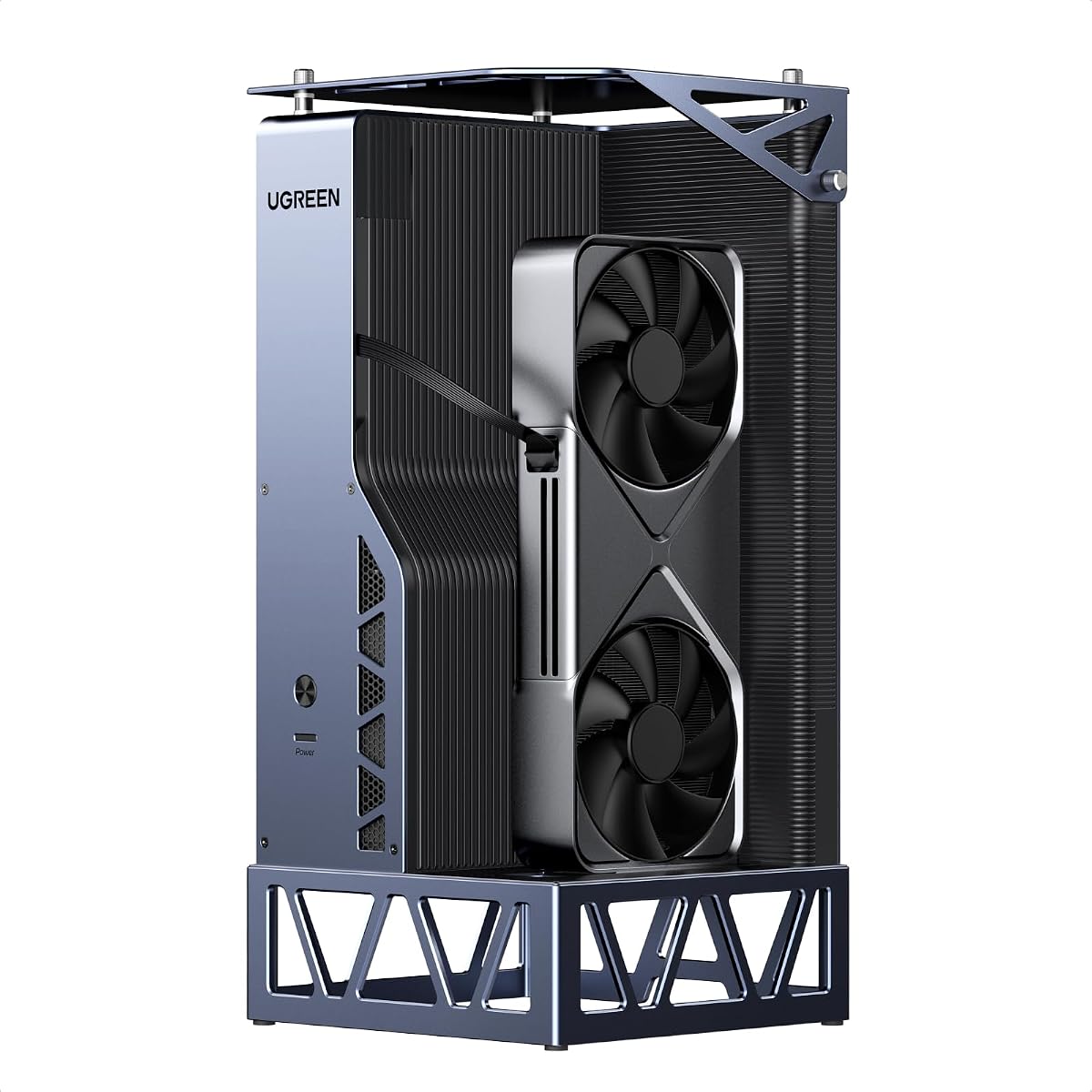
This UGREEN LinkStation eGPU Dock offers dual-channel performance with OCuLink for maximum bandwidth or USB4 for universal compatibility. Its 64Gbps OCuLink ensures near-zero latency for gaming and AI tasks while USB4 hot-swap convenience works with more devices.
We may earn a commission when you buy through this link, at no additional cost to you.
The removable top cover extends compatibility allowing installation of GPUs up to 370mm in length and four slots thick. This future-proof design supports modern high-end cards like RTX 4090 without adapter headaches making it versatile for evolving hardware needs.
Built-in cable storage keeps your workspace tidy while a 100W PD charging cable delivers power to your laptop through a single connection. The semi-open all-aluminum chassis provides efficient passive cooling which is quieter than server-style PSUs found in competitors.
Perfect for enthusiasts who value flexibility and build quality this dock offers a premium DIY experience. Its dual interfaces and GPU expansion options make it a robust hub for laptops handhelds and Mini PCs seeking desktop-grade graphics power.
Switch between OCuLink for raw performance or USB4 for broad compatibility with hot-swap convenience depending on your needs.
The removable top cover accommodates oversized GPUs up to 370mm in length ensuring you can use the latest graphics cards.
We may earn a commission when you buy through this link, at no additional cost to you.
The BOSGAME GVP 7600M eGPU combines graphics performance with storage expansion in one portable enclosure. It includes an AMD Radeon RX 7600M XT card delivering performance equal to an RTX 4050 laptop in a sleek aluminum alloy chassis.
We may earn a commission when you buy through this link, at no additional cost to you.
Beyond graphics it supports up to 4TB of M.2 2280 SSD expansion and includes Ethernet and USB ports for connectivity. Video outputs include two HDMI 2.1 and two DisplayPort 2.0 allowing up to four displays for advanced multi-monitor workflows.
A Turbo Button lets you switch GPU TDP from 100W to 120W for extra performance when needed. The unit weighs about 1.92lb and is FCC and CE certified offering reliable performance for gaming and creative applications.
Ideal for users needing both graphics and storage upgrades this eGPU offers excellent connectivity options. Its four display support and turbo mode make it a powerful tool for professionals and gamers wanting versatility without multiple separate devices.
Up to 4TB SSD expansion allows local storage without relying on external drives for faster file access.
Two HDMI and two DP ports enable four display setups ideal for complex trading or creative production workflows.
We may earn a commission when you buy through this link, at no additional cost to you.
The Nimo eGPU Enclosure brings desktop power in a micro-sized body measuring just 63×115×120.5mm. It integrates an AMD RX 7600M XT with a 240W PSU making it a plug-and-play solution for laptops Mini PCs or handheld gaming devices.
We may earn a commission when you buy through this link, at no additional cost to you.
It features both USB4 80Gbps and Oculink 64Gbps ports for ultra-low latency and massive bandwidth. When connected via USB4 it can deliver 65W Power Delivery to charge your laptop while gaming reducing cable clutter during travel or hybrid work.
Dual display outputs support up to two 8K@60Hz or 4K@120Hz monitors for high refresh AAA gaming and professional rendering. Its portable design fits easily into backpacks making it a companion for on-the-go performance boosts without sacrificing quality.
This enclosure is perfect for users seeking extreme portability with all-in-one convenience. Its dual high-speed interfaces and built-in power make it a versatile option for anyone wanting to upgrade graphics power without dealing with separate components.
At 0.8L this micro eGPU fits in a backpack enabling desktop-class graphics to travel with you anywhere.
65W PD reverse charging delivers power to your laptop while gaming so you can reduce cable clutter effectively.
We may earn a commission when you buy through this link, at no additional cost to you.
Selecting the right external GPU for Mini PC depends on understanding your performance needs available ports and power options.
Check if your Mini PC has OCuLink or Thunderbolt ports since these determine bandwidth and latency. OCuLink offers PCIe 4.0 x4 bandwidth with lower latency while Thunderbolt provides broader compatibility including macOS support.
Choose OCuLink for performance-critical tasks and Thunderbolt if you need universal plug-and-play with multiple devices including Macs.
Many DIY enclosures require a separate standard ATX or SFX power supply so factor in the cost and space needed. All-in-one units include built-in PSUs but limit future GPU upgrades.
Select an all-in-one for simplicity or a DIY dock if you want flexibility to swap graphics cards later.
Ensure the enclosure supports your intended GPU length and slot width since some docks limit size to dual-slot or specific heatsink heights. Check for removable panels or open designs if planning to use large GPUs.
Verify dimensions and mounting options before buying to avoid fitting issues with high-end graphics cards.
Look for HDMI 2.1 and DisplayPort 2.0 outputs to support high refresh rates and 8K resolutions needed for modern gaming or editing. Multiple ports allow for multi-monitor setups without relying on the Mini PC.
Prioritize docks with at least two video outputs if you need expanded screen real estate for productivity.
If you plan to carry the setup frequently choose a compact dock under one liter with lightweight materials and durable connectors. Some models include integrated power supplies to reduce bulk.
Select smaller units with built-in power for travel but expect less GPU flexibility compared to larger enclosures.
Active cooling fans provide better thermal management but add noise while passive designs are quieter but may throttle under load. Consider fan speed control or semi-open designs for balanced performance.
Choose enclosures with effective cooling solutions to maintain stable GPU performance during extended use.
Confirm the dock works with your operating system and that drivers are available before first use. Some models require specific cables for features like follow-start on certain Mini PC brands.
Verify compatibility and driver availability to avoid setup issues or unexpected software limitations.
Look for docks that support PCIe 5.0 or upcoming standards to extend the usable life of your investment. Removable panels or modular designs allow easier upgrades as new GPUs are released.
Prioritize models with flexible construction to adapt to future hardware changes without replacing the enclosure.
Connect the OCuLink or Thunderbolt cable to your Mini PC port after powering off both devices to prevent port damage. Insert your graphics card into the enclosure and secure it before attaching the power supply if required.
Install the latest graphics drivers on your Mini PC before launching games or applications. Some docks require driver installation before first use to ensure stable detection and display output.
Keep the enclosure in a well-ventilated area to prevent overheating during extended gaming sessions. Clean dust from fans and vents regularly to maintain optimal airflow and prolong component lifespan.
Not all Mini PCs support external GPUs. You need an OCuLink or Thunderbolt port to connect an enclosure. Check your Mini PC specifications to confirm compatible ports before purchasing any external GPU setup.
Yes if your Mac Mini has Thunderbolt 3 or 4 support. Most enclosures with Thunderbolt are compatible but OCuLink docks do not work with macOS. Verify macOS support on the product page before buying.
No OCuLink interfaces do not support hot-plugging. You must power off your device before connecting or disconnecting the cable to avoid system crashes or hardware damage. Always follow the manufacturer instructions carefully.
It depends on your graphics card wattage. Most docks support standard ATX or SFX power supplies. Check your GPU power requirements and choose a PSU that meets or exceeds them for stable operation.
Yes installing the latest graphics drivers before first use is essential for stable detection and display output. Some docks may fail to recognize the GPU if drivers are missing before connection.
DIY enclosures allow GPU upgrades but all-in-one units have fixed graphics. If you plan to switch GPUs later choose a dock with open frame design and compatible power supply support.
OCuLink offers PCIe 4.0 x4 bandwidth with lower latency ideal for performance. Thunderbolt provides broader compatibility including macOS but slightly higher latency. Choose based on your host device ports and needs.
Many modern gaming handhelds with OCuLink or USB4 support are compatible. Check specific model compatibility before buying to ensure the dock fits your handhelds ports and power requirements.
The top picks highlight a range of solutions from budget DIY docks to premium all-in-one enclosures. Each option balances performance portability and ease of use to suit different user preferences and Mini PC models.
Prioritize interface compatibility and power flexibility to ensure your external GPU delivers the performance you need. Consider portability needs and cooling design if you plan to move your setup frequently.
Verify current product availability and specifications before purchasing since details may change. Selecting the right dock ensures your Mini PC can handle demanding gaming creative workloads with desktop-grade graphics power.