
1-to-3 ARGB Splitter Cable
4.6Editor score
1-to-3 Splitter Design
11.8 Inch Total Length
Plug and Play Install
This guide compares the top ARGB Splitter Cables for PC builders, evaluating connectivity, durability, and compatibility to help you choose the right RGB
Building a custom PC often requires extending addressable RGB lighting beyond the motherboard limits. High quality ARGB splitter cables ensure your fans and strips sync perfectly without signal loss or color shifts across your entire build.
We analyzed ten leading splitter options based on connector quality, length, and user feedback. Each product was evaluated for compatibility with 5V 3-pin headers to ensure safe and reliable integration into modern gaming rigs.
Below you will find detailed reviews and comparisons of the top models available. Prices fluctuate frequently so verify current listings before purchasing to ensure you get the best value for your specific lighting needs.
4.6Editor score

5.0Editor score

4.9Editor score
This comparison table highlights key specifications for each of the ten top-rated splitter cables to help you quickly identify the best match for your PC lighting setup.


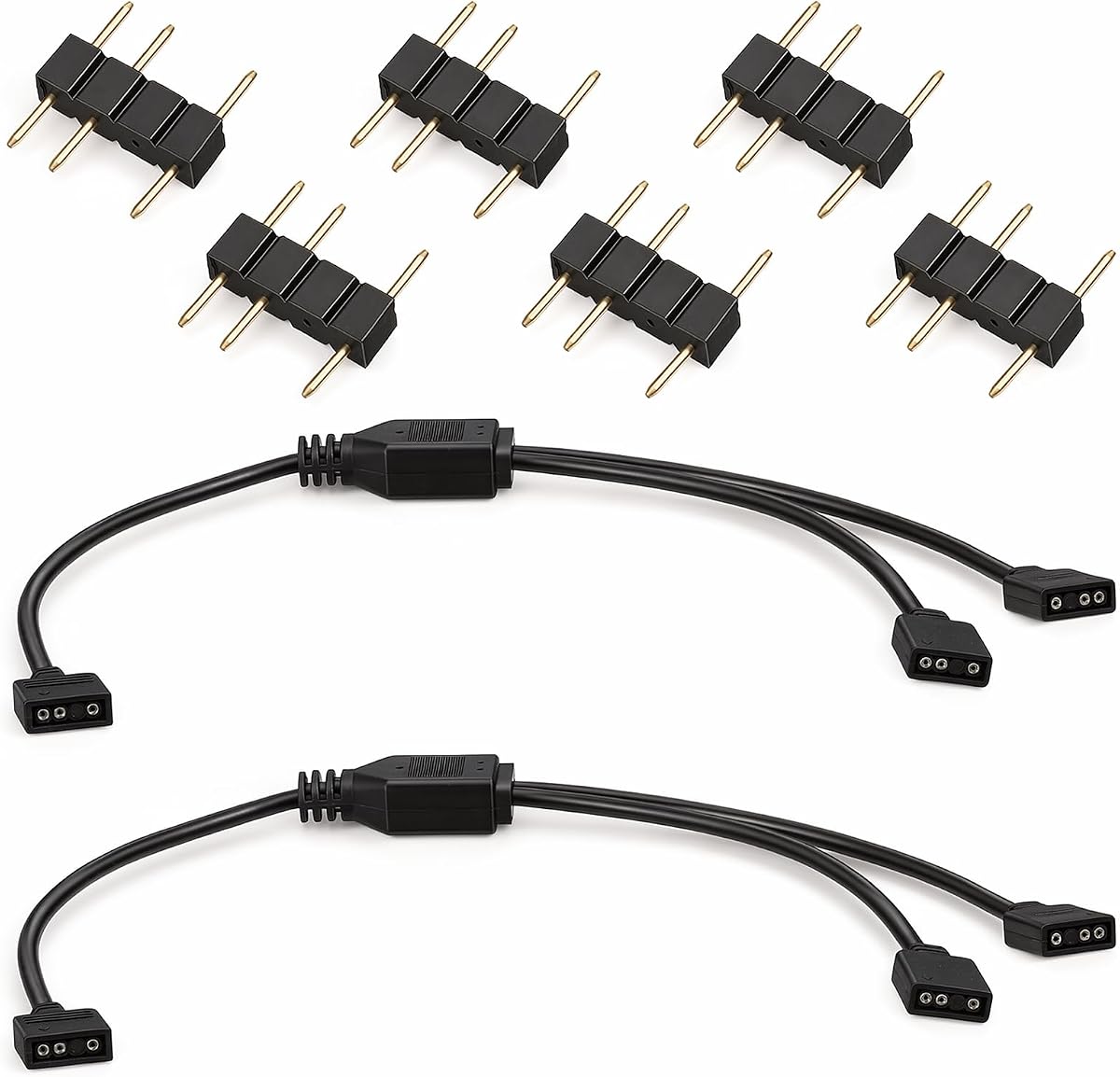


This 1-to-3 ARGB splitter cable offers an excellent entry point for builders looking to expand their lighting without breaking the bank. With a solid 4.6 rating from satisfied users, it delivers reliable signal transmission for 5V addressable RGB devices. The package includes two splitter cables and extra connectors to simplify your installation process immediately.
We may earn a commission when you buy through this link, at no additional cost to you.
The cables support 5050 and 3528 LED strips along with compatible fans through standard 3-pin headers. Installation requires no tools or soldering thanks to the pre-attached male connectors and clear arrow indicators for polarity. The 11.8 inch length provides enough reach for most standard PC chassis configurations while keeping cable clutter to a minimum.
While the cable lacks braided shielding found in more expensive models, it performs reliably for typical home builds. The PVC sheathing is durable enough to handle standard installation stress without immediate wear. Users should ensure they match the arrow markers during connection to avoid any potential signal misalignment issues.
If you need a cost-effective way to power multiple ARGB components from a single header, this product is a strong candidate. It works well for beginners who want to get started with synchronized lighting quickly. Just remember it supports 5V 3-pin headers only and is not compatible with 12V RGB systems.
This splitter lets you connect up to three devices to one header reducing the need for extra motherboard ports.
The plug and play design means you can set up your lighting in minutes without technical experience or tools.
We may earn a commission when you buy through this link, at no additional cost to you.
For builders designing a white themed PC, these white ARGB splitter cables provide a seamless visual match with your other components. The cables maintain a 4.7 rating for their reliable performance and clean look. They feature a soft PVC material that wraps firmly around new copper cores to extend service life and avoid damage.
We may earn a commission when you buy through this link, at no additional cost to you.
Each pack contains two 1-to-2 splitters that allow you to connect multiple RGB fans or strips to a single motherboard header. The soft material makes routing around tight corners easier compared to stiffer black cables. Installation is straightforward with male connectors and clear polarity indicators to ensure correct signal flow every time.
The white sheathing looks great but may require care to prevent staining during handling. Since these are only 1-to-2 splitters you may need multiple packs if you have many devices to chain. However the flexibility and color consistency make them a top choice for custom white builds where appearance matters.
Consider these if you want your lighting cables to blend in with white panels or fans. The extra connectors included in the package help manage your build without needing extra purchases. Verify your header type is 5V 3-pin before ordering to ensure full compatibility with the splitter design.
The white color helps hide cables in white cases for a cleaner and more professional build appearance.
Soft PVC material allows for easier bending and routing in tight spaces without kinking the internal wires.
We may earn a commission when you buy through this link, at no additional cost to you.
This splitter stands out with its safety features including insulating protective caps on each needle interface. It is designed specifically to solve problems with insufficient ARGB headers while maintaining a clean and safe connection. The 13.19 inch length offers a bit more reach than standard options which helps when connecting CPU coolers.
We may earn a commission when you buy through this link, at no additional cost to you.
The cable is widely used for 5V 3-pin devices such as CPU coolers and case fans. Its design ensures that unused needles do not contact the chassis plate which prevents short circuit burns during operation. The simple and practical multi interface setup helps streamline your build process significantly.
While it only comes in a single pack the included caps add a layer of safety for unused ports. This makes it ideal for builders who worry about exposed pins damaging their system. The smooth link design helps solve connection issues without requiring technical knowledge to set up correctly.
If you are installing a CPU cooler with RGB lighting you will appreciate the longer length and protective features. It ensures your components stay powered safely while extending your lighting network easily. Always verify your motherboard header matches the 5V 3-pin standard before plugging in for best results.
Protective caps prevent accidental short circuits by covering unused needles during installation and operation.
The extra length allows you to route the cable to the CPU area without stretching or tension.
We may earn a commission when you buy through this link, at no additional cost to you.
This splitter supports up to five addressable RGB devices from a single header which is great for large cases. The 19.6 inch length provides significant reach to connect components far from the motherboard. It is made from durable plastic and genuine new copper cores to ensure reliable signal transmission over years of use.
We may earn a commission when you buy through this link, at no additional cost to you.
You receive two packs of these splitters allowing you to manage a complex lighting setup with fewer cables. The long extension capability helps route power from headers on the back panel to fans at the front. Installation is easy without tools as the connectors plug directly into your motherboard and fans.
Be aware that longer chains with more devices may introduce slight signal degradation if not managed well. However the copper cores help maintain color consistency across the network. This model is perfect for enthusiasts who want to maximize the number of devices per header.
If you have a full tower case with many fans choose this splitter to cover all zones efficiently. The extra length ensures you can reach tight corners without strain. Just ensure your power supply can handle the load when connecting five devices to one header simultaneously.
With five output ports you can connect an entire fan array or mixed lighting setup to one header.
The 19.6 inch length provides ample slack for complex routing in larger PC chassis.
We may earn a commission when you buy through this link, at no additional cost to you.
This splitter earns a perfect five star rating for its reliability and ease of use. It allows you to connect up to three devices to a single 5V header without signal loss. The package includes two cables and eight male connectors to give you plenty of options for your build.
We may earn a commission when you buy through this link, at no additional cost to you.
The cables are compatible with standard 5050 and 3528 LED strips as well as RGB fans. Installation requires no soldering or tools as you simply align the arrow markers and plug them in. This plug and play design saves time and makes it accessible for beginners.
While the cables use standard PVC sheathing they are durable enough for typical use. The 11.8 inch length balances reach with organization so cables do not clutter the case. Users appreciate the clear instructions and the high quality of the connectors included.
If you want a safe and verified option for your RGB expansion this is a top choice. It works with most modern motherboards and helps achieve synchronized lighting across your setup. Always check your motherboard manual to confirm the header type before connecting the splitter.
A perfect rating reflects consistent performance and high customer satisfaction across multiple builds.
With two cables and multiple connectors you can complete your lighting chain in one purchase.
We may earn a commission when you buy through this link, at no additional cost to you.
This extension cable is designed to bridge gaps between your motherboard header and your RGB devices. It features a 1-to-1 splitter function which means it simply extends the connection without branching devices. The pack includes two cables and extra connectors to help you manage your layout.
We may earn a commission when you buy through this link, at no additional cost to you.
The 11.8 inch length is sufficient for most standard cases to route cables cleanly. Installation is straightforward as you align the arrow markers and plug them in without tools. It supports 5V 3-pin headers and works with fans and LED strips.
While it does not offer multiple branching options it is useful when you need to move a connection point. The female to female design allows you to chain it with other cables if needed. This is a practical solution for simple routing needs without complex splitting.
If your main goal is to reach a fan far from the header this works well. It helps keep cables tidy by moving the connection point closer to the device. Just ensure you are not exceeding the power limits when chaining multiple extensions together.
Use this to reach ports that are far away from your components without branching.
A low price point makes it ideal for builders who need extra reach on a budget.
We may earn a commission when you buy through this link, at no additional cost to you.
This splitter uses pure copper cores to ensure efficient power and data transmission. It helps maintain consistent color and lighting effects across chained devices. The cables are designed as both 1-to-2 splitters and extension cables to give you flexible options for your build.
We may earn a commission when you buy through this link, at no additional cost to you.
Installation is plug and play with standard 3-pin connectors and an arrow indicator for alignment. The pure copper material is a key feature for reducing interference and ensuring stable signals over time. You get two cables plus additional connectors in the package for a complete set.
The length is standard at 11.8 inches which suits most common PC chassis layouts. This is a good choice for those who prioritize signal stability over premium braiding. It is exclusively compatible with 5V 3-pin headers so check your motherboard first.
If you care about signal quality and internal materials this is a great pick. The pure copper cores help avoid the dimming or color shifts that can happen with cheap wires. It is a reliable option for both new builds and upgrades to existing systems.
Pure copper cores reduce resistance to keep your lighting bright and colors accurate.
Use as a splitter to branch devices or as an extension to reach distant headers.
We may earn a commission when you buy through this link, at no additional cost to you.
This pack offers three 1-to-3 splitters which is excellent for covering multiple zones in a case. It includes twelve connectors so you can chain devices across front rear and top fans easily. The cables expand and connect addressable RGB lighting through a single motherboard 3-pin connector.
We may earn a commission when you buy through this link, at no additional cost to you.
The 11.8 inch length works well for standard mid-tower cases where you need to route to front fans. Installation requires no tools as the male pins plug directly into components and headers. This is a practical solution for users who need multiple splitters at once.
With three cables you can organize your lighting into distinct groups without buying separate packs. The connectors are robust and the cables are flexible enough to manage tight spaces. This is a great value for builders planning a full RGB overhaul.
Choose this if you need to split connections for multiple fans or a mix of fans and strips. It simplifies your build process by providing enough splitters for a full case. Always ensure your motherboard has the correct header to support the total power draw.
Three splitters allow you to separate fan groups for better organization and control.
With twelve connectors you can finish your wiring without needing extra purchases.
We may earn a commission when you buy through this link, at no additional cost to you.
This splitter uses pure copper core wires with a soft PVC outer sheath to ensure stable signal transmission. The wear-resistant layer is designed to resist aging and damage over long-term use. It is a plug and play solution with clear arrow markers for easy alignment during setup.
We may earn a commission when you buy through this link, at no additional cost to you.
You receive two cables plus eight connectors in the package to cover most basic lighting needs. The cables support simultaneous expansion of multiple devices to achieve synchronized lighting effects across your case. The soft sheath helps with cable management as it is flexible to bend.
Users report perfect satisfaction with the durability and signal quality of these cables. They work well for fans and LED strips without signal loss or flickering. The design ensures you can group components into zones for visual customization.
If you want reliable cables that won t degrade quickly consider this option. It balances quality materials with an easy installation process. Just verify your motherboard header is 5V 3-pin to avoid compatibility issues during your build.
The soft PVC sheath protects internal wires from fraying and extends cable life.
Pure copper cores with anti-interference design keep colors bright and consistent.
We may earn a commission when you buy through this link, at no additional cost to you.
This premium pack includes four splitter cables and sixteen male connectors for a complete lighting solution. It features gold plated contacts and oxygen free copper wiring to deliver stable data transmission. The braided sleeves prevent tangling and reduce electromagnetic interference for consistent color accuracy.
We may earn a commission when you buy through this link, at no additional cost to you.
You can use one splitter for case fans another for CPU cooler LEDs and others for accent strips. The design is exclusively for 5V 3-pin ARGB headers to ensure proper operation. Installation is tool free as you align the arrow indicators for a secure friction lock join.
While the price is higher than basic options the build quality offers better long term value. The premium materials help avoid signal loss in extended runs. This is ideal for custom configurations where stability and aesthetics are key priorities.
If you want the best materials for your RGB setup this pack is a strong choice. The braiding helps keep your build clean while the gold contacts ensure reliability. Always check your motherboard specifications before installation to confirm compatibility.
Gold plating and oxygen free copper improve signal quality and reduce interference significantly.
Braided sleeves keep cables organized and look better than standard plastic covered wires.
We may earn a commission when you buy through this link, at no additional cost to you.
Selecting the right splitter cable ensures your lighting stays synchronized and safe. We break down the key factors you should consider before buying.
Ensure your splitter matches your motherboard header. Most addressable RGB devices use 3-pin 5V headers. 12V 4-pin headers are not compatible with these splitters and using the wrong type can damage your components.
Always check your manual to confirm the header type before purchasing a splitter.
Choose a splitter that supports the number of devices you need to connect. 1-to-2 and 1-to-3 are common. Higher counts allow more devices per header but may increase the risk of signal loss if the chain is too long.
Match the split count to your case layout to avoid overloading a single header.
Measure the distance between your header and your devices. Standard cables are around 12 inches. Longer cables are available for larger cases but ensure they do not bunch up or cause tension.
A proper length helps keep your build tidy and reduces strain on connectors.
Look for cables with copper cores for stable power transmission. Premium models may use braided sleeves for protection. Basic PVC sheathing is fine for standard builds but braiding looks better.
Higher quality materials extend the life of your cables and reduce the chance of failure.
Some splitters include insulating caps for unused pins. This prevents accidental short circuits when the device is plugged in. Always align arrow markers to ensure correct polarity.
Safety features are critical to protect your motherboard and lighting from damage.
Many kits come with multiple splitters and extra connectors. Buying a pack is often cheaper than buying individual cables. Ensure the number of connectors matches your build needs.
A complete kit saves you from needing to buy more accessories later.
Plug and play splitters require no soldering or special tools. They come with male connectors ready to attach. Look for clear arrow indicators to help you match polarity easily.
Easy installation saves time and makes the build process smoother for everyone.
Confirm that the splitter is designed for addressable RGB devices. It should work with 5V 3-pin headers on major motherboard brands. Not all RGB cables work with addressable LED strips.
Verify compatibility with your motherboard and fans before finalizing your purchase.
To install your splitter, first locate the 5V 3-pin ARGB header on your motherboard. Connect the male plug of the splitter to the header ensuring the arrow aligns with the power indicator. Then connect your RGB fans or strips to the female ports on the splitter.
After connecting all devices, power on your PC and use your motherboard software to control the lighting. If you see flickering or color errors check the connections and ensure no unused pins are exposed to metal surfaces.
To care for your cables, route them gently around the case without bending them too sharply. Keep the connectors clean from dust and check periodically that they remain snug. Replacing cables that show signs of wear helps maintain a safe build.
No, these splitters are designed specifically for 5V 3-pin addressable RGB headers. Using them with 12V 4-pin RGB fans will not work and could damage your equipment. Always check your component specifications before connecting.
Most motherboards support up to 12 devices per 5V 3-pin header. Using a splitter allows you to reach this limit without using multiple motherboard ports. Be aware that power draw should be managed carefully.
If the polarity is reversed the lights may not turn on or could display incorrect colors. Always align the arrow marker on the connector with the motherboard label. Incorrect installation does not usually cause damage but results in poor performance.
Splitting can cause signal degradation if too many devices are chained together. Most users find 1-to-2 or 1-to-3 splitters work well. Keep the total chain length under a few feet to maintain brightness.
Most standard cables use PVC sheathing which is flexible and affordable. Premium options may have braided sleeves for better durability and aesthetics. Check the product details to see if the sheathing matches your build needs.
Many packages include extra male connectors to help you build your lighting chain. If you plan to extend cables further you may need additional pieces. Always count how many plugs you need before buying.
We reviewed ten top-rated ARGB splitter cables to help you expand your lighting setup safely. From budget-friendly packs to premium braided options, each model offers a unique balance of quality and value for different builders.
Prioritize compatibility with your motherboard header and the number of devices you need to connect. Safety features like insulating caps and clear polarity markers should also be key factors in your decision making process.
Keep in mind that prices and availability can change quickly. Always check the current listings to ensure you get the best deal for the specific cable type you need today.