
Logitech H390 Wired Headset
4.4Editor score
Digital stereo sound quality
Rotating noise canceling mic
Plug-and-play USB connection
This guide compares the top headsets for Teams Meetings featuring noise cancellation, long battery life, and certified audio quality for professionals.
Finding the right headset for Teams meetings is essential for clear communication and professional focus. A good headset should offer reliable connectivity, effective noise cancellation, and comfortable wear for long calls.
We have analyzed ten top-rated products based on user feedback, technical specifications, and certification standards. Our comparison covers wireless and wired options suitable for various work environments and budget ranges.
Each pick highlights key strengths and potential trade-offs to help you make an informed decision. Please note that product availability and pricing can change frequently so verify details before purchasing.
4.4Editor score

4.1Editor score

4.5Editor score
This side-by-side comparison reviews ten distinct headsets designed for professional communication and Teams meetings. Each model offers unique features ranging from wired simplicity to advanced wireless noise cancellation capabilities.


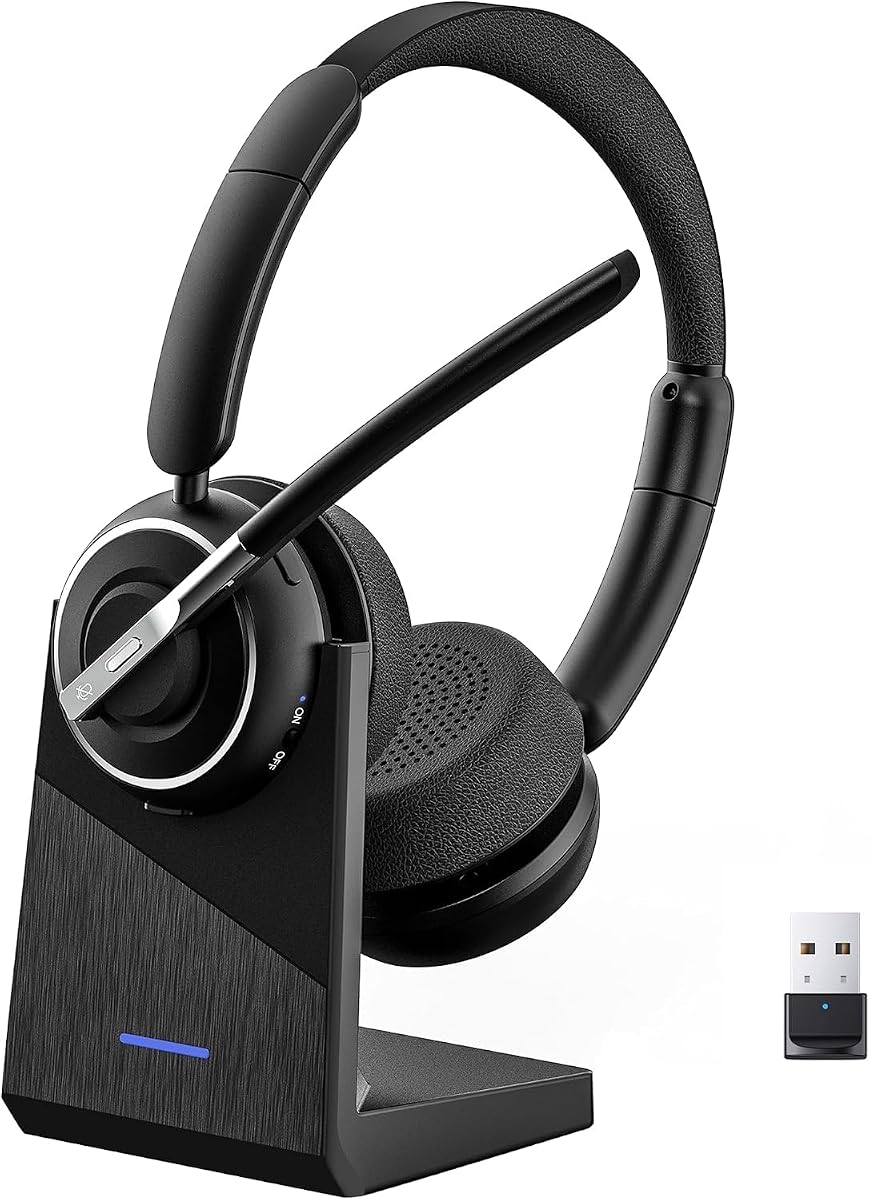
The Lenovo Wireless VoIP Headset earns our Editor's Choice award for its reliable certification and robust feature set. It balances performance and comfort effectively for daily Teams meetings and hybrid work scenarios.
We may earn a commission when you buy through this link, at no additional cost to you.
Its Teams Open Office certification ensures seamless integration with Microsoft platforms while Bluetooth 5.3 multipoint allows smooth switching between devices. The three-mic noise suppression blocks distractions effectively during busy calls.
While the USB receiver is necessary for full Teams functionality users may find the connection process slightly less intuitive than native Bluetooth. The lightweight design helps but ear fatigue is still possible over many hours.
Professionals needing official certification without premium costs will appreciate this headset. It offers a solid foundation for clear audio and reliable connectivity in virtual work environments.
Certification guarantees optimized audio drivers and call controls designed specifically for the Teams platform.
Bluetooth multipoint connects two devices simultaneously while the USB receiver ensures stable performance on PCs.
We may earn a commission when you buy through this link, at no additional cost to you.
The Logitech H390 stands out as the best budget option for basic Teams meetings requiring simple setup. It delivers clear digital stereo sound and a reliable noise-canceling microphone at a very accessible price point.
We may earn a commission when you buy through this link, at no additional cost to you.
Its rotating boom mic minimizes background noise during conversations while in-line controls allow quick volume and mute adjustments. The plush padded earcups offer comfort for extended work sessions without feeling too tight.
The main limitation is the fixed cable which restricts movement compared to wireless alternatives. Some users may find the plastic build less durable than premium models but it holds up well for office use.
Teams seeking a no-fuss headset for occasional meetings will find this model ideal. It provides essential features for clear communication without unnecessary complexity or high costs.
Plug-and-play USB connectivity means no drivers or software installation is required before using it.
The rotating noise-canceling boom effectively filters out ambient noise for clearer voice transmission.
We may earn a commission when you buy through this link, at no additional cost to you.
This headset delivers advanced noise suppression with Hybrid Active Noise Cancellation for blocking ambient distractions. It ensures your voice remains clear during calls through dedicated ENC on the microphone.
We may earn a commission when you buy through this link, at no additional cost to you.
The flip-to-mute feature offers instant privacy without searching for buttons while the Qualcomm dongle provides a stable low-latency connection for PC users. Comfortable ear cushions make it suitable for long shifts.
Users relying on mobile devices may find the dongle redundant or inconvenient. The weight is manageable but might not suit those preferring ultra-light options for all-day wear.
Busy professionals working in noisy environments will benefit most from this model. Its focus on sound isolation and quick mute functionality makes it a strong contender for office use.
Combines active noise cancellation with microphone ENC to reduce background noise for both listening and speaking.
Bluetooth 5.4 and a dedicated dongle ensure a strong reliable link without dropouts during calls.
We may earn a commission when you buy through this link, at no additional cost to you.
The Jabra Evolve 20 is designed for straightforward Teams calls with reliable performance and comfort. Its lightweight design reduces strain during long meetings while noise-canceling microphones ensure clear communication.
We may earn a commission when you buy through this link, at no additional cost to you.
Support for both USB-A and USB-C adds flexibility for different laptop models. The foam or leatherette ear cushions provide a soft fit without clamping too tightly on the head.
Wired connections limit physical range which may be inconvenient for users moving around. The audio is adequate for calls but not optimized for music or entertainment purposes.
This headset is ideal for professionals prioritizing comfort and call clarity over advanced features. It delivers consistent quality for standard Teams meetings without complexity.
The lightweight construction ensures you can wear it for hours without discomfort or fatigue.
Certified for Microsoft Teams and works seamlessly with other major online meeting platforms.
We may earn a commission when you buy through this link, at no additional cost to you.
The Zone Vibe 100 offers a featherlight design suitable for users who prioritize comfort above all else. Its flip-to-mute mic provides instant privacy while Bluetooth multipoint allows easy switching between devices.
We may earn a commission when you buy through this link, at no additional cost to you.
Digital signal processing and beamforming technology help isolate your voice clearly during meetings. The 40mm speakers deliver rich audio making it versatile for both calls and casual music listening.
Its battery life is lower than many competitors and it lacks a charging case. Some users report connectivity issues which may affect reliability for critical business calls.
Those seeking a stylish and comfortable headset for occasional use will appreciate this model. It balances casual aesthetics with professional functionality effectively.
Memory foam earpads and a lightweight build prevent fatigue even during extended wear sessions.
Beamforming technology focuses on capturing your voice clearly while reducing background distractions.
We may earn a commission when you buy through this link, at no additional cost to you.
This wireless headset stands out with a massive 40-hour talk time ideal for travelers and heavy users. Environmental noise cancelling ensures clear audio while the included USB dongle supports reliable PC connections.
We may earn a commission when you buy through this link, at no additional cost to you.
Dual pairing allows simultaneous connection to laptop and smartphone for seamless switching. The charging stand keeps the headset organized and ready for use whenever needed.
The mute function only activates during calls which might confuse users expecting a global mute. It lacks official Teams certification meaning call controls may not fully integrate with the platform.
Professionals needing long battery life without daily charging will find this model ideal. Its practical features and reliable performance make it a strong option for remote work.
A single charge provides up to 40 hours of talk time reducing downtime significantly for travelers.
Connects to two devices at once allowing you to switch between calls and chats smoothly.
We may earn a commission when you buy through this link, at no additional cost to you.
The Zone 301 stands out for its customization features via LogiTune software allowing adjustments to EQ and mic levels. Replaceable earpads extend the product life and maintain hygiene for daily users.
We may earn a commission when you buy through this link, at no additional cost to you.
Dual beamforming mics help cancel background noise effectively for clear conversations in shared spaces. The headset is lightweight with a padded headband ensuring comfort over several hours.
Its overall rating is lower than competitors suggesting potential issues with build quality or software. Call management controls are basic compared to more advanced Teams-certified models.
Tech-savvy users who want to tweak audio settings will enjoy this model. It offers good value for those looking to personalize their audio experience.
LogiTune allows users to adjust sidetone mic levels and equalization for personalized sound.
Replaceable earpads mean the headset can be maintained rather than discarded when cushions wear out.
We may earn a commission when you buy through this link, at no additional cost to you.
This headset uses AI noise cancelling to filter out keyboard clicks and office chatter effectively. A charging base keeps the headset organized while a massive 65-hour battery ensures long uninterrupted use.
We may earn a commission when you buy through this link, at no additional cost to you.
The reversible ear hook allows left or right ear wearing for personalized comfort. Instant mute controls and voice assistant buttons make managing calls convenient without touching the device.
Hook-style designs may not fit everyone securely which can affect stability during movement. The dongle is limited to PCs so mobile users rely solely on Bluetooth connectivity.
Remote workers needing a versatile and long-lasting headset will appreciate this model. Its AI features and charging base add significant convenience to daily routines.
AI algorithms identify and suppress constant background noises to keep your voice clear and natural.
A reversible ear hook lets you choose the side that feels most comfortable for your setup.
We may earn a commission when you buy through this link, at no additional cost to you.
The PrancyBt headset is praised for filtering out 99.9% of surrounding interference ensuring flawless voice clarity. Its 270-degree rotatable earcups relieve pressure while adjustable headbands fit various head shapes comfortably.
We may earn a commission when you buy through this link, at no additional cost to you.
Built with a high-capacity battery it offers up to 35 hours of continuous operation for long shifts. A USB dongle ensures stable connections on computers lacking native Bluetooth capability.
The dongle only works with Windows systems which limits flexibility for Mac users. Less brand recognition compared to major players may raise questions about long-term support.
Individuals working in noisy environments will benefit most from its superior noise filtering. It delivers professional-grade call quality at a competitive price point.
Advanced noise reduction tech filters out almost all interference so your voice sounds perfectly crisp.
Fast charging ensures minimal idle time while a 35-hour battery keeps you connected for days.
We may earn a commission when you buy through this link, at no additional cost to you.
The Lenovo Dual Mode Wireless ANC Headset 6550 represents a premium option with full Teams certification and hybrid active noise cancellation. It offers excellent audio quality and reliable connectivity for professionals demanding top-tier performance.
We may earn a commission when you buy through this link, at no additional cost to you.
Dual connectivity allows seamless switching between Bluetooth and USB-C while the ergonomic design ensures comfort over long periods. A 60-hour playback battery supports extended travel or work sessions.
The higher price point makes it less accessible for budget-conscious buyers. The included case adds bulk which may not suit those prioritizing minimalism in their gear.
Enterprise users seeking reliable high-quality communication tools will find this headset ideal. Its certification and ANC make it a strong investment for corporate environments.
Hybrid ANC isolates your voice and reduces background noise for unmatched call clarity.
Up to 60 hours of playback ensures you stay connected without frequent recharging.
We may earn a commission when you buy through this link, at no additional cost to you.
Selecting the right headset requires understanding your specific work environment and connectivity needs. This guide outlines key factors to consider for optimal performance.
Wireless headsets offer freedom of movement and multipoint pairing for seamless switching between devices. Wired options provide stable low-latency connections ideal for stationary desks.
Choose wireless if mobility is critical and wired if you prioritize reliability without charging.
Active noise cancellation reduces ambient distractions while environmental noise cancellation improves voice clarity. Hybrid systems combine both for optimal performance in busy environments.
Look for ENC or hybrid ANC if you work in noisy offices or home environments with distractions.
Battery duration varies widely from 18 to 60 hours depending on features like ANC usage. Fast charging and stand options add convenience for busy professionals.
Prioritize models offering at least 30 hours if you frequently travel or work long shifts.
Certified headsets include dedicated buttons and drivers optimized for the Teams platform. This ensures seamless integration and reliable call management.
Opt for certified models if you rely heavily on Teams for daily business communication.
Lightweight designs and adjustable headbands prevent fatigue during extended wear. Memory foam earcups provide a soft seal for privacy and comfort.
Select models with replaceable cushions to extend the headset's usable life over time.
Boom mics generally provide better voice quality than built-in ones. Physical mute buttons offer quick privacy without navigating software menus.
Ensure the mute function works intuitively if you frequently join confidential discussions.
Bluetooth versions like 5.3 or 5.4 improve range and stability. USB dongles offer a reliable alternative for devices lacking Bluetooth.
Check compatibility with your devices to avoid connection issues during meetings.
Quality materials ensure the headset withstands daily wear and tear. Warranty coverage protects against manufacturing defects for peace of mind.
Look for brands with established reputations for build quality and customer support.
Pair your wireless headset via Bluetooth settings or plug in the USB receiver. Ensure Teams recognizes the device under audio settings before joining calls.
Clean earcups weekly with a soft cloth to maintain hygiene. Store wireless headsets in a cool dry place away from direct sunlight.
Charge devices fully before extended use and avoid letting the battery drain completely. Update firmware regularly via manufacturer apps to maintain performance.
Most models listed are compatible with Teams but only specific units are officially certified. Certified headsets include dedicated call buttons for streamlined management. For non-certified models ensure audio settings prioritize them during calls.
Active noise cancellation reduces external noise for the listener while environmental noise cancellation improves your voice clarity. Hybrid models combine both for optimal performance in noisy environments.
Check that the mic is unmuted physically and via software. Ensure the correct input device is selected in Teams settings. Update drivers or firmware if connectivity persists.
Most models support macOS via Bluetooth connectivity. USB dongles may require Windows but Bluetooth allows pairing with Apple devices for calls and music.
Replace earcups when they show wear or hygiene concerns. For daily users this may be every 12 months. Check if replacement parts are available before buying.
Yes most models deliver good audio quality for music. However some focus primarily on voice clarity and may lack bass for entertainment.
We have reviewed ten top headsets ranging from budget-friendly wired models to premium wireless options with advanced noise cancellation. Each pick offers unique strengths tailored to different professional needs and environments.
Prioritize factors like noise cancellation, battery life, and certification based on your daily routine. Comfort remains critical for users attending multiple meetings throughout the day.
Verify current pricing and compatibility before purchasing to ensure you choose the right model for your needs. The best headset is one that fits your work style and delivers clear reliable communication.