
LAFVIN R3 Camera Smart Robot Car
4.5Editor score
WiFi video streaming
Five operation modes
Open-source learning
This guide compares ten top Arduino robot kits for students and makers, evaluating features, sensors, coding platforms, and build complexity to find the ideal
Choosing the right Arduino robot kit can transform a curious student into an engaged engineer. These kits combine hardware assembly with programming logic, offering hands-on experience in electronics and software development. A good kit provides clear instructions, reliable components, and enough flexibility to encourage experimentation beyond the basic tutorial.
We evaluated ten popular options based on build quality, sensor variety, coding support, and educational value. Each product was assessed for its ability to guide users from assembly to autonomous operation. The list includes everything from simple car chassis to advanced tank treads and humanoid-like structures for diverse learning paths.
Each pick highlights specific strengths like camera integration, remote control options, or expandability through additional modules. Prices and availability change frequently, so verify current details before purchasing. These selections aim to match different skill levels and project goals within the growing field of accessible robotics education.
4.5Editor score

4.5Editor score

4.3Editor score
This side-by-side comparison outlines the core capabilities of each robot kit, focusing on control methods, sensor types, chassis design, and coding environment compatibility to help you select the most suitable platform for your specific learning objectives and project needs.


The ELEGOO UNO R3 Smart Robot Car Kit V4 stands out as a top choice for those seeking a comprehensive introduction to robotics. With a solid rating, it combines an Arduino-compatible controller with modern features like FPV video and obstacle avoidance. The kit allows users to assemble a functional vehicle that can navigate autonomously or be controlled remotely.
We may earn a commission when you buy through this link, at no additional cost to you.
Its primary strength lies in the balance between educational value and playability. The keyed connectors significantly reduce wiring errors, which is a common pain point for beginners. The inclusion of an onboard camera enables live video streaming to a smartphone, adding an immersive layer to the experience. You can program the car to follow lines, avoid obstacles, or patrol a specific route.
While the kit is highly rated, some users may find the initial setup of the FPV module slightly involved without prior experience. The remote controller requires a separate battery, which is a minor inconvenience. However, these are acceptable trade-offs given the robust feature set and the extensive library of tutorials provided.
This kit is ideal for students, parents, and educators looking for a structured yet expandable project. It teaches essential concepts in sensors, motor control, and logic programming. We recommend it for anyone ready to move beyond simple LED circuits into full autonomous navigation.
The integrated camera and ESP32 module stream real-time video to your phone, transforming the car into a remote surveillance device.
Keyed XH2.54 connectors and illustrated tutorials minimize wiring mistakes, making the build process smooth for first-time builders.
We may earn a commission when you buy through this link, at no additional cost to you.
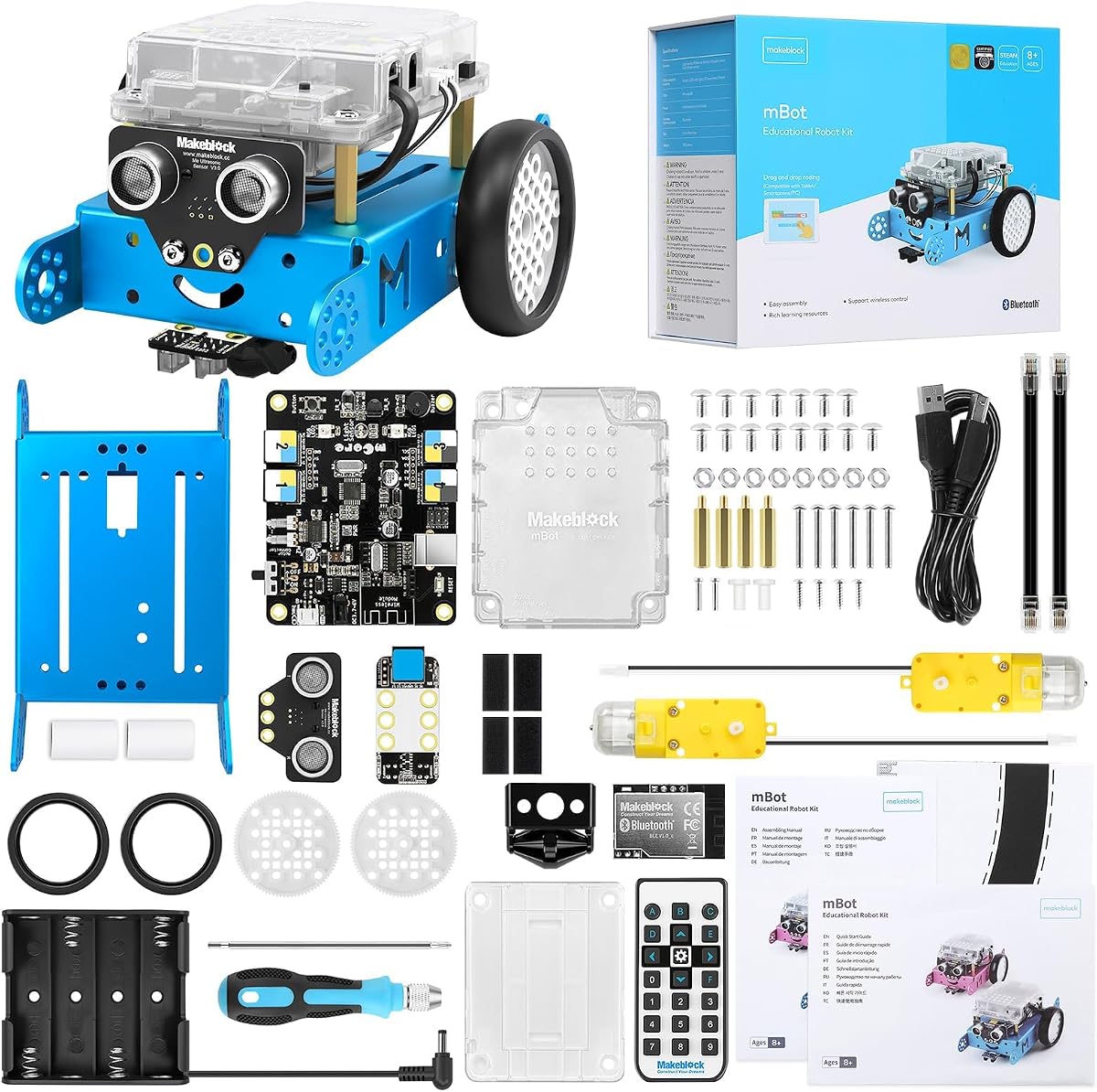
The Makeblock mBot is designed specifically for younger learners, offering an entry point into electronics and programming without overwhelming complexity. It features a sturdy metal chassis and clear instructions that allow assembly in as little as fifteen minutes. This rapid setup ensures that children spend more time coding and playing than soldering.
We may earn a commission when you buy through this link, at no additional cost to you.
The educational value is enhanced by its transition from Scratch block-based coding to text-based Arduino IDE. This progression helps students understand the underlying logic as they advance. The kit includes coding cards and matches with free apps, providing a structured learning path. It is also compatible with over a hundred electronic modules for future expansion.
Some users note that the remote controller requires a specific coin cell battery that is not included. Additionally, the robot itself needs four AA batteries, which must be purchased separately. These costs are minimal compared to the overall value of the educational experience provided.
This kit is perfect for children aged eight to twelve who are just starting their STEM journey. It encourages creativity through its open-source design and compatibility with other platforms. We recommend it as a gift for aspiring young engineers.
Students start with drag-and-drop Scratch blocks and can advance to full C++ Arduino code as their skills mature.
The open-source platform allows connection to hundreds of modules, enabling custom projects like robotic arms or sensors.
We may earn a commission when you buy through this link, at no additional cost to you.
The ELEGOO Conqueror Robot Tank Kit offers a rugged alternative to standard wheeled cars, focusing on tank-style treads for better traction. It features a stainless steel chassis that adds durability to the build. The kit includes a camera for FPV driving and sensors for autonomous navigation, making it a versatile tool for exploration.
We may earn a commission when you buy through this link, at no additional cost to you.
Its standout feature is the five interactive modes, ranging from line tracking to obstacle avoidance and auto-follow. The camera is mounted on a servo, allowing users to adjust the viewing angle while driving, which adds a layer of tactical control. This makes it particularly engaging for indoor navigation challenges.
Building the tank takes more time than a basic car due to the track tension and chassis assembly. It is also heavier, requiring careful handling. However, the metal construction ensures longevity. The kit is recommended for ages ten and up due to the complexity of the build.
This tank kit is suitable for those looking for a more industrial look and feel in their robot. It teaches mechanical assembly and sensor integration effectively. We suggest it for users ready to tackle a slightly more advanced project.
The adjustable camera allows you to look up or down while driving, enhancing navigation in varied environments.
Metal tracks provide stability and traction on various surfaces, ideal for navigating obstacles that wheels might slip on.
We may earn a commission when you buy through this link, at no additional cost to you.
The ELEGOO Tumbller Self-Balancing Robot Car introduces a fascinating physics challenge: keeping a two-wheel robot upright. It uses real-time motor control and motion sensing to maintain balance, offering a unique learning experience compared to standard cars. The kit is highly rated for its ability to demonstrate closed-loop control systems.
We may earn a commission when you buy through this link, at no additional cost to you.
It offers six distinct ways to play, including obstacle avoidance and auto-follow, alongside the balancing mode. The robot features LED effects that add a visual flair to its operation. The assembly process is well-documented, guiding users through the complex wiring required for the balance system.
The balancing robot can be sensitive to uneven surfaces and requires careful calibration to function correctly. This can be a source of frustration if not handled gently. However, the ability to recover from small pushes through bounce mode shows the sophistication of its code.
This kit is recommended for those interested in the dynamics of balance and feedback loops. It is an excellent addition to a maker's collection for variety. We suggest it for users who have already built a standard car kit.
The motor control algorithm adjusts speed and angle continuously to keep the robot standing upright against gravity.
Six LED patterns provide visual feedback on the robot's status, adding an aesthetic element to the project.
We may earn a commission when you buy through this link, at no additional cost to you.
The ACEBOTT Smart Robot Car Kit stands out for its use of Mecanum wheels, which allow the robot to move in any direction, including sideways and diagonally. This capability offers a more advanced mechanical design compared to standard wheels. It is controlled by an ESP32 board, providing robust computing power for complex tasks.
We may earn a commission when you buy through this link, at no additional cost to you.
The kit emphasizes expandability with various expansion packs available for cameras, robotic arms, and solar power. This modular approach encourages long-term engagement. It includes eighteen story-rich tutorials to guide users through programming principles step by step. The dual control via app and remote adds convenience.
The Mecanum wheels can be slightly harder to align than standard wheels during assembly. Also, the kit does not include batteries, requiring additional purchase. However, the freedom of movement it provides justifies the extra effort for many makers.
This kit is ideal for users looking to explore omnidirectional movement and advanced robotics concepts. It is particularly good for those interested in visual programming and future expansions. We recommend it for teenagers and adults.
Mecanum wheels allow the robot to strafe, rotate, and move in any direction without turning its body.
The open design supports add-ons like robotic arms and solar panels, enabling diverse project variations.
We may earn a commission when you buy through this link, at no additional cost to you.
The LAFVIN R3 Camera Smart Robot Car offers a budget-friendly entry into robotics with high-end features like real-time video streaming. It uses an ESP32-S3 module for Wi-Fi connection, allowing users to view a live feed from the car. This makes it an excellent option for those on a tight budget who do not want to sacrifice functionality.
We may earn a commission when you buy through this link, at no additional cost to you.
It supports five intelligent operation modes, including object following and obstacle avoidance. The pan-tilt unit allows you to adjust the camera angle remotely. The kit relies on an open-source ecosystem, meaning access to free learning resources and code libraries is abundant. It is designed for full self-assembly to build skills.
As a budget option, the chassis materials are simpler compared to premium kits. The assembly process requires attention to detail to ensure sensors work correctly. However, these are minor trade-offs for the price. It remains a solid choice for hobbyists.
This kit is best for those seeking cost-effective learning. It covers essential coding and hardware concepts efficiently. We recommend it for students or beginners looking for a starter project.
Free tutorials and code samples are available online to support independent learning and troubleshooting.
You can move the camera up, down, left, and right via app control for better situational awareness.
We may earn a commission when you buy through this link, at no additional cost to you.
The ACEBOTT 4 in 1 Smart Robot Arm Kit offers a unique modular approach, allowing users to build a tank car, a robotic arm, or a combination. This flexibility is appealing for those who want variety without buying multiple kits. It includes a 5DOF programmable arm that can grab and move objects.
We may earn a commission when you buy through this link, at no additional cost to you.
The tank tracks provide stability for all-terrain exploration, while the robotic arm adds a manipulation layer. Tutorials guide users through assembly and coding. It supports both Scratch and Arduino, making it accessible for different ages. The app and remote control offer convenience for operation.
This kit has a slightly lower rating compared to others, which may indicate inconsistencies in part quality or support. The assembly is complex due to the number of parts involved. Users should expect to spend more time on setup. However, the end result is a versatile platform.
It is suitable for older kids and teens ready for complex builds. It teaches mechanical design and multi-axis control. We suggest it for users who want a project that evolves.
The arm has five degrees of freedom to manipulate objects with precision and dexterity.
Rubber tracks ensure traction on various surfaces, expanding where you can take your robot.
We may earn a commission when you buy through this link, at no additional cost to you.
The SunFounder Ultimate Starter Kit is designed as a comprehensive learning system rather than a single robot. It includes hundreds of components to support dozens of projects, ranging from blinking LEDs to smart cars and IoT applications. This variety helps users build a strong foundation in electronics.
We may earn a commission when you buy through this link, at no additional cost to you.
Expert-designed video courses guide the learning process, ensuring that no question is left unanswered. The kit is suitable for beginners as young as eight. It also offers community support and technical help. The focus is on progressive skill building rather than a single outcome.
If you specifically want a ready-to-drive robot, this kit requires more assembly and configuration. The sheer number of parts can be overwhelming for some. However, it offers the most value for long-term learning. It is a complete education package.
This kit is ideal for those planning to learn Arduino thoroughly. It balances hardware and software effectively. We recommend it for students and lifelong learners.
Partnered courses provide step-by-step lessons that walk you through each project's logic and wiring.
192 items allow you to build many different projects, not just a robot, maximizing the kit's utility.
We may earn a commission when you buy through this link, at no additional cost to you.
The Makeblock mBot Ultimate is a high-end platform designed for serious makers and students. It allows the construction of ten different models, including tanks and robotic arms, using high-strength aluminum alloy. This durability ensures that the robot survives rough handling and multiple projects.
We may earn a commission when you buy through this link, at no additional cost to you.
Its MegaPi control board supports advanced programming languages like C++ and Python. It is also compatible with Raspberry Pi for machine vision and advanced tasks. The modular design allows you to rebuild your robot completely as skills grow. It is a powerful tool for engineering education.
The price is significantly higher than basic kits, and the assembly is complex. It requires time and patience. However, the quality of the parts and the depth of the software support justify the cost for those seeking professional-level learning.
This kit is best for teenagers and adults with robotics experience or strong ambition. It offers a long-term solution for STEM projects. We recommend it for competitive teams or serious hobbyists.
The powerful board allows for multiple sensors and motors to run in perfect sync for complex tasks.
You can write scripts in higher-level languages, preparing you for real-world software development.
We may earn a commission when you buy through this link, at no additional cost to you.
The Freenove Hexapod Robot Kit introduces a completely different form factor: a six-legged walking robot. It uses independent motors for each leg to create realistic gaits. This offers a unique challenge compared to wheeled robots, as the programming involves coordination of multiple servos.
We may earn a commission when you buy through this link, at no additional cost to you.
It supports control via remote, Android, iPhone, or computer. The app provides visual interfaces for movement and programming. The kit is designed for assembly and provides detailed code examples. It can walk, crawl, and twist, providing a wide range of movement.
The assembly involves precise alignment of servos to prevent binding. Batteries are not included, which adds to the cost. However, the ability to build a walking robot is a rare opportunity. It stands out for its distinct design.
This kit is recommended for those interested in biomechanics or complex coordination. It offers a rewarding challenge for programmers. We suggest it for makers who want something unique.
Six legs allow the robot to walk over uneven surfaces that wheels would get stuck on.
Each motor is controlled independently, allowing for complex gait patterns and recovery from falls.
We may earn a commission when you buy through this link, at no additional cost to you.
Selecting the right robot kit depends on your specific goals, budget, and technical comfort. This guide highlights the key factors to consider before making a purchase.
Beginner kits often provide pre-wired components and visual coding tools to ease the entry. Advanced kits may require soldering and text-based programming. Check the recommended age range and complexity of assembly to ensure it matches your ability.
Choose a kit that challenges you without being overwhelming, allowing for a smooth learning curve.
Look for kits that include useful sensors like ultrasonic, infrared, or line tracking. Some kits offer cameras for FPV streaming, which adds realism to the project. Consider what functionality you want to achieve, such as obstacle avoidance or autonomous navigation.
More sensors mean more complex programming but also more engaging outcomes for your robot.
Ensure the kit uses a controller compatible with Arduino IDE or Scratch. Some kits use proprietary microcontrollers that may limit long-term learning. If you plan to advance to text coding, choose a kit that supports standard Arduino boards.
Compatibility with open-source software ensures you can find support and code examples easily.
Metal chassis kits are generally more durable and suitable for rough terrain, while plastic kits are lighter and easier to assemble. Consider where you plan to operate the robot, indoors or outdoors, to decide on the material.
A robust build quality ensures the robot can withstand repeated assembly and experimentation.
Check whether the kit includes a rechargeable battery or requires disposable cells. Rechargeable options offer better value over time. Also, verify the voltage and capacity to ensure the robot runs long enough for your projects.
A reliable power source prevents interruptions during programming and testing sessions.
Kits with modular designs allow you to add robotic arms, cameras, or other modules later. This flexibility keeps the project relevant as your skills grow. Look for open-source platforms that support third-party accessories.
A modular system maximizes the longevity and utility of your investment.
Detailed tutorials, video courses, and active communities are invaluable for troubleshooting. Kits with extensive documentation help you understand the 'why' behind the code. This support is critical for long-term success.
Strong support materials ensure you do not get stuck when facing technical hurdles.
Prices vary widely based on components and complexity. Determine your budget and weigh it against the number of parts and features included. Often, a slightly higher price buys better durability and longer usability.
Prioritize value and learning potential over the lowest upfront cost.
Begin by carefully reading the assembly instructions and organizing all components. Ensure the battery is charged and properly connected before powering up the robot. Follow the provided code examples to test basic movements and sensor functions.
Keep the robot clean and free of debris that could jam wheels or sensors. Store it in a dry place and avoid dropping it to prevent mechanical damage. If the robot is not functioning correctly, check the wiring and sensor calibration first.
Modify the code gradually to implement new features. Regular practice with small adjustments helps build confidence. Document your changes to track progress. This consistent care ensures the robot remains a functional tool for learning.
Yes, many kits in this list support block-based coding and provide guided tutorials. They are designed to help you learn the basics before moving to advanced programming. You do not need prior experience to start.
Scratch uses visual blocks to write code, while Arduino uses text-based C++. Some kits allow you to start with Scratch and transition to Arduino as you learn. Both are valid ways to program robots.
Most modern kits use keyed connectors to minimize soldering. However, some advanced models might require minor soldering for custom connections. Check the product description for specific assembly requirements before buying.
Some higher-end kits like the Makeblock Ultimate are compatible with Raspberry Pi. However, most basic kits are designed for Arduino microcontrollers. Compatibility depends on the specific model and its ports.
Build times vary from fifteen minutes to several hours depending on complexity. Simple car kits are quick to assemble, while tanks or hexapods take longer. Check the estimated time in the product details.
This depends on the specific kit. Some include rechargeable batteries, while others require you to buy AA or coin cells separately. Always verify the included items before purchasing to avoid delays.
We have reviewed ten diverse kits ranging from simple cars to advanced tank treads and legged robots. Each offers a unique pathway to learning electronics and coding. The best choice depends on your specific goals and technical comfort.
Prioritize kits that offer clear instructions and support. A good kit should be flexible enough to allow you to create custom projects. Consider the features that matter most to you, such as cameras or expandability.
Remember to check current prices and availability as these can change. Investing in the right kit can spark a lifelong interest in technology and engineering. We hope this guide helps you find the perfect platform for your robotics journey.