
TP-Link ER605
4.4Editor score
Five Gigabit Ports
One USB WAN Port
Highly Secure VPN
This guide compares the top load balancing routers for businesses and power users, evaluating WAN ports, failover capabilities, and security features to help
Load balancing routers distribute internet traffic across multiple connections to ensure stability and speed for demanding networks. They are essential for offices that cannot afford downtime and require consistent performance during peak usage hours.
We evaluated ten professional-grade models based on WAN port flexibility, failover reliability, and advanced security suites. Each entry offers distinct advantages for small offices, remote setups, or enterprise environments seeking robust wired connectivity.
Each pick highlights specific strengths like open-source support, high throughput, or cloud management. Prices and availability vary by retailer, so verify current stock before purchasing to ensure you get the right model for your network needs.
4.4Editor score

4.7Editor score

4.0Editor score
The following table presents a side-by-side comparison of ten top-rated load balancing routers. It highlights key specifications such as port counts, WAN support, and unique features to help you differentiate between models.


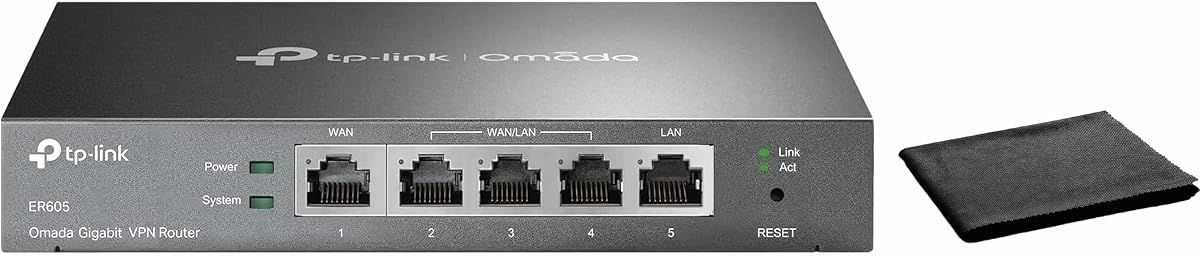

The TP-Link ER605 is a reliable choice for businesses seeking affordable load balancing without sacrificing core functionality. With a solid 4.4 rating, it stands out for its flexible port configuration and secure VPN capabilities.
We may earn a commission when you buy through this link, at no additional cost to you.
Its five Gigabit ports allow for up to three WAN connections, optimizing bandwidth usage effectively. The included USB port supports 4G/3G modem backup, ensuring continuity during primary line failures.
While it lacks some advanced enterprise features, its robust security policies and firewall defenses provide essential protection. The interface is straightforward, making it ideal for small offices or remote setups.
If you need a cost-effective router for basic load balancing and failover, this model delivers excellent value. It balances performance and price well for users with moderate network demands.
The ER605 offers flexible port configurations with one WAN and two WAN/LAN ports, allowing users to adapt to various network setups easily.
Supporting up to 20 LAN-to-LAN IPsec connections, it ensures secure remote access for distributed teams without compromising network integrity.
We may earn a commission when you buy through this link, at no additional cost to you.
The TP-Link ER7206 is designed for professional environments needing extensive client support and flexible WAN configurations. With a 4.5 rating, it excels in scalability and centralized management via the Omada SDN platform.
We may earn a commission when you buy through this link, at no additional cost to you.
It supports up to 700 clients and offers a unique SFP WAN port alongside traditional Gigabit ports. This flexibility allows for diverse internet connections and optimized bandwidth usage across complex networks.
Cloud access through the Omada app simplifies management across multiple sites, making it ideal for growing businesses. However, leveraging full SDN features requires compatible controllers and devices.
For businesses needing robust capacity and centralized control, this router provides a solid foundation. It balances professional-grade performance with manageable deployment options for IT administrators.
With support for up to four WAN ports, the ER7206 ensures businesses can scale their internet connectivity as needs evolve without replacing hardware.
Integration with Omada SDN offers a unified interface for managing gateways, access points, and switches, streamlining network operations significantly.
We may earn a commission when you buy through this link, at no additional cost to you.
The Cudy R700 stands out for its OpenWRT compatibility, offering advanced control over VLAN segmentation and custom QoS policies. With a 4.4 rating, it attracts users who value flexibility and community-developed packages.
We may earn a commission when you buy through this link, at no additional cost to you.
It connects up to five ISPs with automatic failover, ensuring high availability for critical business operations. The built-in VPN suite supports multiple protocols, making it versatile for secure remote access.
Web GUI and Cudy App cloud management simplify monitoring, while diagnostic tools aid in troubleshooting. However, leveraging full OpenWRT features may require technical expertise and familiarity with command-line interfaces.
For tech-savvy users or IT admins seeking deep customization, this router delivers professional-grade control. It balances cost with enterprise-level features for those willing to configure advanced settings.
Full OpenWRT support unlocks the segmentation and custom firewall rules, allowing administrators to tailor the network to specific security and performance needs.
By supporting up to five ISPs, the R700 ensures continuous connectivity, automatically rerouting traffic if one connection fails to maintain business operations.
We may earn a commission when you buy through this link, at no additional cost to you.
The Alta Labs Route10 is a high-performance router designed for advanced networks requiring 10Gbps throughput. With a 4.0 rating, it appeals to users needing raw speed and hardware-accelerated processing for heavy workloads.
We may earn a commission when you buy through this link, at no additional cost to you.
Powered by a Qualcomm quad-core processor, it delivers low latency and consistent performance for routing and firewall rules. The inclusion of two 10Gbps SFP+ ports and 40W PoE+ output enhances connectivity and device power options.
Real-time monitoring and traffic visibility help administrators optimize bandwidth usage effectively. However, it does not broadcast Wi-Fi, requiring external access points for wireless coverage, which adds to the overall setup cost.
For enterprise environments demanding maximum wired performance, this router provides a robust solution. It balances speed, security, and PoE capabilities for networks prioritizing reliability and throughput.
With support for 10Gbps wired routing, the Route10 eliminates bottlenecks, ensuring smooth data transfer for high-bandwidth applications and large file transfers.
Integrated PoE+ output allows direct powering of access points and network devices, simplifying cabling and reducing the need for separate power adapters.
We may earn a commission when you buy through this link, at no additional cost to you.
The Omada ER7412-M2 offers extensive connectivity with 12 total ports and support for up to 11 WAN connections. With a 4.5 rating, it caters to large enterprises requiring massive bandwidth and complex network segmentation.
We may earn a commission when you buy through this link, at no additional cost to you.
Its multi-Gigabit capabilities ensure high throughput, while advanced security features like IPS/IDS protect against sophisticated threats. VPN support includes WireGuard and OpenVPN, facilitating secure remote access for distributed teams.
While powerful, the device demands careful configuration to maximize its potential. It integrates well with Omada SDN systems, providing centralized management for large-scale network deployments.
For organizations needing maximum port density and WAN flexibility, this router is an excellent choice. It combines performance, security, and scalability for demanding business environments.
With 12 ports including two 2.5G interfaces, the ER7412-M2 accommodates diverse network segments without requiring additional switches or hardware.
Load balancing across up to 11 WAN ports ensures maximum utilization of multi-line broadband, reducing costs and improving reliability for large businesses.
We may earn a commission when you buy through this link, at no additional cost to you.
The TP-Link TL-R470T+ remains a solid choice for small offices needing basic load balancing on a budget. With a 4.2 rating, it supports up to four WAN ports for bandwidth aggregation and failover.
We may earn a commission when you buy through this link, at no additional cost to you.
Its portal authentication feature simplifies network access management for clients. While limited to 10/100M speeds, it offers reliable performance for environments where Gigabit connectivity is not critical.
Built-in lightning protection safeguards the network from power surges, adding durability to the unit. However, the slower speeds may not suffice for modern high-bandwidth applications.
For internet cafes or small setups prioritizing cost over speed, this model delivers practical functionality. It ensures stability without breaking the bank for users with modest network requirements.
Portal authentication allows administrators to manage client access easily, making it suitable for public Wi-Fi or guest networks in small businesses.
Advanced load balance ensures maximum bandwidth availability by distributing traffic across four WAN connections, enhancing stability without complex configuration.
We may earn a commission when you buy through this link, at no additional cost to you.
The TP-Link TL-R480T+ offers flexible port configuration with three configurable WAN/LAN ports, making it adaptable for small networks. With a 4.2 rating, it provides essential load balancing features in a compact chassis.
We may earn a commission when you buy through this link, at no additional cost to you.
It balances three WAN connections effectively, ensuring reliable failover when primary connections fail. The small size makes it ideal for tight spaces in offices or home labs.
However, it lacks advanced features like VPN tunneling or high-speed Gigabit support. For basic routing needs, it remains a dependable and straightforward option for users seeking simplicity.
Ideal for small businesses needing basic redundancy, this router delivers value without unnecessary complexity. It serves well for setups prioritizing cost and compact design over high throughput.
With three configurable ports, users can adapt the router to various network topologies, optimizing connections based on specific organizational needs.
The small case fits easily into limited spaces, making it perfect for desktop use or mounting in small server rooms without crowding.
We may earn a commission when you buy through this link, at no additional cost to you.
The TP-Link ER-605 Gigabit VPN Router combines dual WAN load balancing with strong security features for business use. With a 4.3 rating, it ensures reliable internet access while protecting sensitive data.
We may earn a commission when you buy through this link, at no additional cost to you.
Its SPI firewall and DoS defense provide essential protection against cyber threats. Bandwidth management ensures critical applications get priority, maintaining performance during peak usage periods.
Cloud monitoring through the Omada app simplifies oversight, while easy setup reduces deployment time. However, the web interface may feel basic compared to more advanced enterprise models.
For small to medium businesses seeking balanced security and performance, this router offers solid value. It ensures uptime and safety without requiring complex configuration or technical expertise.
With SPI firewall and DoS defense, the ER-605 protects against common network threats, ensuring safe and reliable connectivity for business operations.
Intelligent bandwidth management prioritizes critical applications, ensuring consistent performance for essential business tools and services.
We may earn a commission when you buy through this link, at no additional cost to you.
The Ubiquiti EdgeRouter 4 is highly rated for its performance and professional management capabilities. With a 4.6 rating, it appeals to IT professionals needing precise control over routing and traffic prioritization.
We may earn a commission when you buy through this link, at no additional cost to you.
Its three Gigabit ports and one SFP port offer flexible connectivity options for various network segments. The fanless design ensures silent operation, making it suitable for noise-sensitive environments.
While powerful, it requires technical expertise to configure load balancing rules manually. It does not offer native multi-WAN balancing features out-of-the-box compared to specialized business routers.
For advanced users seeking reliable hardware and deep configurability, this router delivers excellent value. It balances performance, silent operation, and professional features for network administrators.
The SFP port enables fiber optic connections, extending network reach and offering high-speed alternatives for specific infrastructure needs.
Without a fan, the EdgeRouter 4 operates silently, making it ideal for office environments where noise levels must remain low.
We may earn a commission when you buy through this link, at no additional cost to you.
The Omada Fusion 2.5G combines 2.5G speed support with advanced load balancing capabilities, earning a top 4.7 rating. It features a quad-core CPU to handle traffic efficiently without bottlenecks.
We may earn a commission when you buy through this link, at no additional cost to you.
Its touchscreen provides instant insights into health scores and traffic, simplifying on-site troubleshooting. Bluetooth setup via the Omada app streamlines initial configuration and adoption of other devices.
With support for four-WAN load balancing, it ensures robust failover and bandwidth optimization. However, full benefits require integrating with the Omada ecosystem for centralized cloud management.
For businesses balancing speed and usability, this router offers an ideal blend of performance and convenience. It simplifies management while delivering high-speed connectivity for modern networks.
The built-in touchscreen provides real-time traffic data and alerts, reducing the need for external devices during troubleshooting.
Bluetooth setup via the Omada app accelerates deployment, allowing administrators to adopt devices quickly without complex command-line configurations.
We may earn a commission when you buy through this link, at no additional cost to you.
Selecting the right load balancing router depends on understanding your specific network requirements. Consider factors like port capacity, speed support, and management features to ensure the device meets your needs.
Ensure the router offers enough WAN and LAN ports to connect multiple ISPs and local devices without needing external switches. Look for flexible ports that can switch between WAN and LAN roles as needed.
Check the number of Gigabit or Multi-Gigabit ports available to avoid bottlenecks and ensure sufficient connection points for your hardware.
Automatic failover ensures traffic reroutes instantly if one internet connection fails, keeping operations running smoothly. This is critical for businesses that cannot afford downtime or performance drops.
Verify the router supports automatic failover across multiple WAN links to maintain continuous connectivity during outages.
The router must handle your total bandwidth requirements without slowing down. Check for support of Multi-Gigabit speeds if you have high-speed fiber connections or heavy data loads.
Opt for models with hardware acceleration to ensure consistent performance under heavy traffic conditions.
Secure remote access requires robust VPN protocols like IPsec, OpenVPN, or WireGuard. Ensure the router supports these standards to allow safe connections for remote employees.
Adequate tunnel capacity ensures multiple users can connect simultaneously without performance degradation.
An intuitive web interface or mobile app simplifies configuration and monitoring. Cloud management allows remote access, making it easier to manage multiple locations from a single dashboard.
Look for models with clear dashboards that provide real-time traffic insights to help troubleshoot issues quickly.
Essential security features like firewall policies, DoS defense, and intrusion prevention protect against online threats. These ensure data integrity and secure network access for all users.
Ensure the router includes built-in protection against common attacks to reduce reliance on external security appliances.
OpenWRT support provides deep customization options for advanced users who need specific configurations or third-party packages. This flexibility allows for tailored security and traffic shaping rules.
If you require custom QoS or specialized networking features, look for routers that support open-source firmware.
Choosing a router within an existing ecosystem allows better integration with other devices like switches and access points. This simplifies network management and ensures seamless communication across hardware.
Consider whether the brand offers unified management software that can control your entire network infrastructure.
Connect your ISPs to the designated WAN ports and configure the load balancing rules in the settings menu. Ensure all connections are active before enabling traffic distribution to verify stability.
Regularly update the firmware to maintain security and performance. Most routers offer automatic update options in the management interface to reduce manual intervention.
Monitor traffic usage through the dashboard to identify bottlenecks. Adjust QoS settings based on critical application requirements to maintain consistent performance during peak hours.
A load balancing router distributes internet traffic across multiple connections to maximize bandwidth and ensure reliability. It allows users to combine multiple ISP lines for faster speeds or redundancy.
Yes, effective load balancing requires at least two internet connections from different providers. This setup ensures failover capability and increased throughput for demanding networks.
Failover automatically redirects traffic to a backup connection when the primary link fails. This prevents downtime and keeps critical applications running without manual intervention.
Yes, many models support high-speed fiber connections via SFP or Gigabit ports. Ensure the router's throughput matches your ISP's speed to avoid bottlenecks.
Most modern routers offer cloud-based management for remote monitoring and configuration. This feature allows IT admins to control settings from anywhere via a web interface or app.
Setup varies by model, but most offer intuitive wizards and mobile apps to simplify configuration. Basic load balancing rules can be configured quickly without deep networking knowledge.
Many professional models support three or more WAN connections to balance traffic across multiple ISPs. Check the router's specifications to confirm the maximum number of supported WAN ports.
Reputable models include firewalls and encryption to secure traffic distribution. Ensure you enable security features to protect data flowing through multiple internet connections.
This guide covers ten top load balancing routers, ranging from budget-friendly models to high-performance enterprise solutions. Each option offers unique strengths in ports, security, and management capabilities.
Prioritize your need for speed, scalability, and ease of use when selecting a model. Ensure the router supports your required WAN count and integrates well with existing infrastructure.
Prices and availability change frequently, so check current listings before purchasing. Verify warranty and support terms to ensure long-term reliability for your business network.